Someone enquires. You reply. They say “thanks, I’ll have a think” or, more often, say nothing at all. And then life gets busy, and that lead quietly drifts off to whoever followed up next.
Most small business owners I talk to don’t lose work because their reply was bad. They lose it because there was no second message. Following up feels awkward, it’s easy to forget, and nobody wants to be the pushy business that keeps chasing.
The good news is that follow-up is one of the most rule-based jobs in your business, which makes it a great fit for AI. In this post I’ll walk you through the simple 7-day follow-up setup I use with small businesses: three short, helpful messages, written by the AI assistant you already have, approved by you, and stopped the moment someone replies.
Why follow-up falls through the cracks
It’s rarely laziness. It’s usually one of these:
- There’s no list. Leads live across your inbox, Facebook messages, a website form and your phone. If they’re not in one place, there’s nothing to follow up from.
- There’s no rule. “I’ll follow up in a few days” is a good intention, not a system. Without set days, it never quite happens.
- Writing the message feels hard. You don’t want to sound desperate, so you put it off until it feels too late to bother.
- You’re doing the actual work. When you’re on the tools or with clients all day, chasing last week’s enquiries is the first thing to go.
An AI follow-up agent fixes the last two problems straight away. A simple lead list fixes the first two, and you’ll set that up in about ten minutes below.
What a 7-day follow-up agent actually does
It’s not an automated sales machine that bombards people. For a small business, the agent does three things:
- Checks your lead list for people who enquired, got your first reply, and haven’t booked or replied since.
- Drafts the right follow-up for where they’re up to: day 1, day 3 or day 7.
- Stops for good as soon as the person replies, books or asks you to stop.
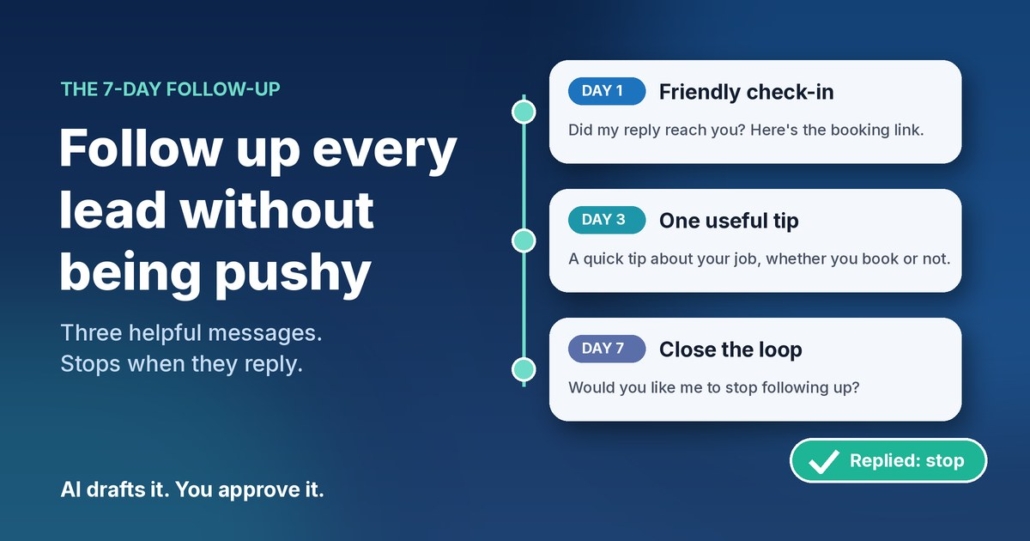
Three messages. That’s it. Each one has a different job, so none of them feels like a copy of the last.
Message 1 (day 1): the friendly check-in
A short note to make sure your first reply didn’t get buried, with your booking link again. Plenty of “no response” leads simply missed your message.
Message 2 (day 3): something genuinely useful
One practical tip related to what they asked about. A plumber might mention what to check before the visit. A physio might share a simple thing to avoid until the appointment. This is the message that builds trust, because it helps whether they book with you or not.
Message 3 (day 7): closing the loop
A polite “I don’t want to keep filling up your inbox. Would you like me to stop following up?” It sounds counterintuitive, but giving people an easy way out is respectful, and it often gets a reply when the first two didn’t.
How to set it up with the AI assistant you already have
You can build this today with ChatGPT, Claude, Grokbot or any AI assistant. No code, no new software.
Step 1: Start a simple lead list
Create a spreadsheet with these columns: name, contact details, date of enquiry, what they asked for, date of first reply, follow-ups sent, and status (open, booked, replied, stop). If you already use a CRM, you probably have most of this. If not, a Google Sheet or Excel file is plenty to start with.
Step 2: Write your follow-up brief
Open a new chat, project or custom assistant and give it the rules. Here’s a template you can fill in:
“You write short follow-up messages for [business name], a [type of business] in [area]. I’ll give you the lead’s first name, what they enquired about, and which follow-up this is (1, 2 or 3). Write in Australian English, in a warm, helpful tone, no more than 50 words. Follow-up 1: check they got my reply and include my booking link. Follow-up 2: share one practical tip related to their enquiry, then the booking link. Follow-up 3: politely ask whether they’d like me to stop following up. No fake urgency, no discounts unless I give you one, no more than one exclamation mark. Booking link: [link]. Sign off as [your first name].”
Save it so you can reuse it every time. That brief is your agent.
Step 3: Test it on old leads first
Pick five enquiries from the last month that went quiet. Ask your assistant for all three follow-ups for each one and read them as if you were the customer. Would you feel helped or hassled? Note anything you keep changing.
Step 4: Fix the brief, not the drafts
If you keep removing the same phrase or adding the same detail, turn it into a rule. “Never say ‘just checking in’.” “Mention we’re booked out two weeks ahead.” “Use the tip library below for message 2.” After a couple of rounds, most drafts should be ready to send with little or no editing.
Step 5: Run it once a day
Pick a regular time, such as 8am with your coffee. Look at the list, see who’s due a follow-up today, paste their details into your saved assistant, approve the draft and send. Update the row. If your AI tool supports scheduled tasks or routines, you can have it pull together the day’s due follow-ups and drafts for you each morning, so all you do is check and send.
Step 6: Track it for a month
Add one more column: “came back after follow-up?” After a month you’ll know, from your own numbers, whether follow-up is winning you work. I’d rather you trust that than anyone’s promises, including mine.
Guardrails so you’re helpful, not pushy
Stop the moment they reply
This is the most important rule. If someone replies, books or says no thanks, they come off the follow-up list immediately and you take over the conversation personally. Nothing kills trust faster than an automated “just following up!” after someone already said no.
Know the difference between a follow-up and marketing
Replying to someone’s enquiry about the job they asked about is one thing. Adding them to your newsletter or sending promotions is another. In Australia, commercial emails and messages fall under the Spam Act 2003, and the Australian Communications and Media Authority (ACMA) explains the rules in its guide to avoiding spam. In short, ACMA says you need consent to send marketing messages, and each message must identify you as the sender, include your contact details and make it easy to unsubscribe. Keep your follow-ups tied to what the person actually asked for, always sign off with your business name and contact details, and treat a “stop” as final. If you’re unsure where your messages sit, get proper advice.
Be careful with personal information
Your lead list holds names, phone numbers and email addresses. The Office of the Australian Information Commissioner (OAIC) has guidance on privacy and the use of commercially available AI products, including checking whether a tool’s terms let the provider use what you enter and, as best practice, not putting personal information into publicly available AI chatbots. The AI doesn’t need a phone number to write a good follow-up. Give it a first name and the job, and keep the contact details in your list.
Keep three messages as the limit
Three thoughtful messages over a week is attentive. Seven messages over a fortnight is annoying. If someone hasn’t responded after the closing-the-loop message, mark them as closed and let them go. They know where to find you.
When to take it further
The copy-and-paste version is a great place to start, and for many businesses it’s enough. It’s worth connecting things up properly when:
- You’re following up more than a handful of leads each day.
- Leads come from several sources and keeping the list up to date is becoming a job in itself.
- You want follow-ups drafted and waiting for approval automatically, with replies detected so nobody gets chased by mistake.
- More than one person in your team handles enquiries and you want everyone following the same rules.
That’s the kind of setup I help businesses build, and a free AI audit is the easiest way to see whether it’s worth it for you.
Follow-up works best when your first reply is fast too. If you haven’t sorted that yet, read my guide on how to reply to every new enquiry fast with AI. And if you’re still deciding which job to hand to AI first, start with my 30-minute small business AI audit.
Frequently asked questions
How many follow-ups should I send?
Three over about a week works well for most small businesses: a check-in, something useful, then a polite message offering to stop. After that, mark the lead as closed and stop contacting them.
Won’t automated follow-ups feel spammy?
Not if each message is short, relevant to what the person asked about, and stops the moment they reply. Starting with a draft-and-approve setup means you read every message before it goes out, so nothing gets sent that you wouldn’t write yourself.
Do I need a CRM for this?
No. A simple spreadsheet with each lead’s name, enquiry, dates and status is enough to start. A CRM becomes useful once you have more leads, more sources or a team sharing the work.
Is it legal to follow up people who enquired?
Following up the job someone asked you about is generally a normal part of doing business, but marketing messages are covered by the Spam Act 2003. ACMA’s guide explains the consent, identification and unsubscribe rules. Keep follow-ups tied to the original enquiry, include your business details, honour every request to stop, and get advice if you’re unsure.
Which AI tool is best for writing follow-ups?
Whichever one you already use and are comfortable with. The brief above works in ChatGPT, Claude, Grokbot or any AI assistant. The quality comes from your rules and examples, not the brand of tool.
Get the 7-Day Follow-Up agent (free)
The full follow-up prompt, setup steps and a daily routine are in my free Steal My AI Agents pack, along with agents for instant lead replies, reviews, onboarding, inbox triage and your weekly business review. It works with ChatGPT, Claude, Grokbot or any AI assistant. No code needed.
Rather have it set up for you? Book a free AI audit.