You finish a job, the client is happy, they say “we’ll leave you a review” and mean it. Then their week gets busy and the review never happens. Meanwhile the one client who had a bad day finds the time to write three paragraphs.
That’s not because your happy clients don’t care. It’s because nobody asked them at the right moment, in a way that took ten seconds. Asking for reviews is a small, repetitive job that’s easy to forget, which makes it a good fit for an AI assistant.
In this post I’ll show you a simple review request setup for a small business: one friendly message after every finished job, written with the AI assistant you already use, sent to every client, and set up in a way that keeps you on the right side of Google’s rules and Australian consumer law.
Why happy clients don’t leave reviews
When I talk to business owners about reviews, the same few problems come up:
- Nobody asks. You meant to send a message once the invoice went out, then the next job started.
- The ask comes too late. A week later the client has moved on and the job isn’t front of mind any more.
- It’s too much effort for them. “Search for us on Google and leave a review” is three steps too many. A direct link is one tap.
- The message feels awkward to write. So you put it off, or you send the same stiff template to everyone.
An AI review requester solves the timing and writing problems. Your Google review link solves the effort problem. Together they turn “we should ask for reviews” into something that just happens after every job.
First, the rules: ask everyone, the same way
Before we build anything, there’s one trap to avoid, because a lot of review tools fall straight into it.
A common trick is to ask clients for a rating first, then only send the Google review link to the people who score you 4 or 5 and quietly send everyone else to a private feedback form. It’s often called “review gating”, and it’s not allowed.
Google’s Maps user-generated content policy says merchants must not “discourage or prohibit negative reviews, or selectively solicit positive reviews from customers”. It also bans offering incentives such as payment, discounts or free services in exchange for a review. Google can remove reviews and restrict a Business Profile that breaks these rules.
In Australia, the ACCC says the same thing in its own way. Its page on online reviews for products and services explains that reviews should reflect people’s genuine opinions, and that any incentive for a review has to apply whether the review is positive or negative and be clearly disclosed. In its True Value Solar media release, the ACCC described a business that offered a free service only to customers who’d had a positive experience, and the program was discontinued after the ACCC investigated.
So the setup in this post follows three simple rules:
- Every finished job gets the same request, with the review link, whether you think they loved it or not.
- No incentives. No discounts, prizes or freebies for reviews.
- You never tell people what to write or what rating to give.
You can still invite private feedback. You just offer it alongside the review link, not instead of it. This isn’t legal advice, so if you’re unsure about anything in your industry, check with someone qualified.
What an AI review requester actually does
For a small business, the agent has three jobs:
- Notices a finished job. That might be an invoice marked paid, a job closed in your job app, or a row you tick off in a spreadsheet.
- Drafts a short, personal thank-you that mentions the actual job and includes your Google review link.
- Flags replies for you. If someone replies with a problem, you see it and deal with it yourself, as a person.
That’s it. One message per job, with an optional gentle reminder a few days later if they haven’t reviewed and haven’t replied. No chasing beyond that.
The message: thank them, then ask
Keep it to two or three lines, and send it the same day or the day after the job, while it’s fresh. Something like:
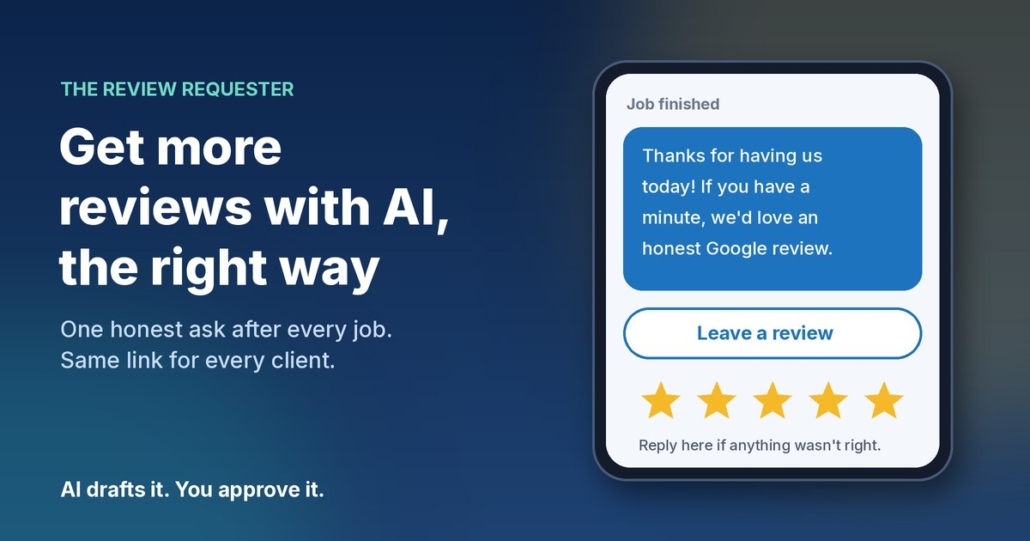
Hi Sarah, it’s Mike from Example Plumbing. Thanks for having us out to fix the hot water system today. If you’ve got a minute, we’d really appreciate an honest Google review: [link]. And if anything wasn’t right, just reply here and I’ll sort it out.
Notice what that message does. It thanks them for something specific, it asks for an honest review, it gives them a one-tap link, and it offers a direct line if something went wrong. Everyone gets exactly the same offer.
The reminder: one nudge, then stop
If there’s no review and no reply after about five days, one short reminder is fine:
Hi Sarah, just a quick one in case my last message got buried. Here’s that review link if you’d like to share how we went: [link]. No worries either way, and thanks again.
After that, leave it. Two messages is helpful. Five is annoying.
How to set it up in about 20 minutes
Step 1: Get your Google review link
In your Google Business Profile, look for the option to ask for reviews. Google’s tips to get more reviews explain how to create a link or QR code that takes customers straight to the review form. Save that link somewhere handy.
Step 2: Make a simple finished-jobs list
A spreadsheet is enough. Columns for the client’s name, their phone or email, what the job was, the date it finished, and whether the request and reminder have been sent. If your job or invoicing app already tracks finished jobs, use that instead.
Step 3: Give your AI assistant a clear brief
Open ChatGPT, Claude, Grokbot or any AI assistant and paste in a brief like this, filled in with your details:
You write review request messages for [business name], a [type of business] in [area]. I’ll give you a client’s first name and the job we did. Write a two- or three-line SMS from [your name] that thanks them for the specific job, asks for an honest Google review with this link: [link], and says they can reply if anything wasn’t right. Use Australian English, sound friendly and down to earth, no emojis. Never offer a discount or reward, never suggest a rating or what to write, and never change the message based on how happy you think they are.
Then add two or three messages you’ve written yourself as examples, so it picks up how you actually talk.
Step 4: Draft and approve, then send
Each afternoon, paste in the jobs you finished that day and ask for a message for each. Read them, tweak anything that doesn’t sound like you, and send. It takes a couple of minutes. Once you trust the drafts, you can connect it to your job app or SMS tool so it runs on its own, but start with approving every message.
Step 5: Reply to the reviews you get
Google’s own tips recommend replying to reviews, good and bad. Your AI assistant can draft those replies too. Just read them before posting, keep them short and specific, and never share a client’s private details in a public reply.
What to do when someone isn’t happy
Sooner or later a client will reply with a problem instead of a review. That’s the system working, not failing. You heard about it while you can still fix it.
Call them, sort it out, and don’t ask them to change or remove anything in return. If they’ve already left a negative review, reply politely, acknowledge the issue and offer to take it offline. Google’s guidance points out that a mix of positive and negative feedback often looks more trustworthy than a wall of five stars anyway.
The one thing the AI should never do is handle an unhappy client on its own. It drafts, it flags, and you take it from there.
Frequently asked questions
Can I only ask my happy clients for a review?
No. Google’s policy says businesses must not selectively ask for positive reviews or discourage negative ones, and the ACCC warns against practices that give a misleading picture of what customers think. Ask every client the same way.
Can I offer a discount for leaving a Google review?
Not on Google. Its policy bans incentives like payment, discounts or free services in exchange for reviews. The ACCC’s general rule is that any review incentive must apply regardless of whether the review is positive or negative and must be clearly disclosed, but Google doesn’t allow incentives at all, so it’s simplest not to offer them.
When is the best time to ask for a review?
As soon as the job is finished, ideally the same day or the next. The work is fresh in their mind and they’re most likely to take the minute to do it.
Is it okay to ask for private feedback as well?
Yes, as long as it sits alongside the review request rather than replacing it. Give everyone the review link and let them reply privately if they’d prefer to raise something with you directly.
Which AI tool should I use?
Whichever one you already use. The brief above works in ChatGPT, Claude, Grokbot or any AI assistant. What makes the messages good is your example messages and clear rules, not the brand of tool.
Get my AI agents (free)
My free Steal My AI Agents pack has ready-to-use agents for reviews, instant lead replies, follow-ups, client onboarding and inbox triage, with the prompts and setup steps. It works with ChatGPT, Claude, Grokbot or any AI assistant. No code needed.
Rather have it set up for you? Book a free AI audit.