Ask most small business owners what slips first when things get busy and you’ll hear the same answer: social media. You mean to post a couple of times a week. Then a big job comes in, the week disappears, and the last thing on your Facebook page is from six weeks ago.
The problem usually isn’t writing. It’s sitting down every few days, staring at a blank box and trying to think of something to say. AI is very good at taking that part off your plate. In this post I’ll show you how I’d plan a month of social media posts with AI in one sitting: find post ideas in your real customer questions, build a monthly calendar with one prompt, get the AI writing in your voice, use your own photos, and batch the lot so you’re not thinking about it again until next month.
Step 1: Mine real customer questions for post ideas
The best posts for a small business aren’t clever. They answer the questions your customers already ask, show the work you already do, and explain things people are unsure about.
Where to find your ideas
- Your own reviews. Copy your Google reviews into ChatGPT, Claude or Grokbot and ask: “What do customers mention most? What were they worried about before they hired us?” Every theme is a post.
- Competitors’ reviews. Search “[your service] [your city]”, open the top three competitors and copy their reviews in too. Look for complaints you can address (“They never turned up on time” becomes a post about how you confirm bookings).
- Enquiries and emails. The questions people ask before they buy are perfect posts. “Do I need council approval for this?” “How long does it take?” “What’s included in the quote?”
If you’ve already built a team FAQ from real customer questions, you’re halfway there. Every question in it can become a short post. And if you’ve been asking for more Google reviews, you’ll have fresh material coming in every month.
A prompt to turn it into a list
Paste your reviews, questions and notes into your AI assistant, then ask:
“Here are customer reviews and questions for my business, [business name], a [type of business] in [city]. Group them into common themes. For each theme, suggest three social media post ideas that answer a question, show our work or explain our process. Use Australian English. Don’t invent facts, prices or results.”
You’ll end up with 20 to 40 ideas in a few minutes. That’s more than a month’s worth.
Step 2: Turn your ideas into a monthly content calendar
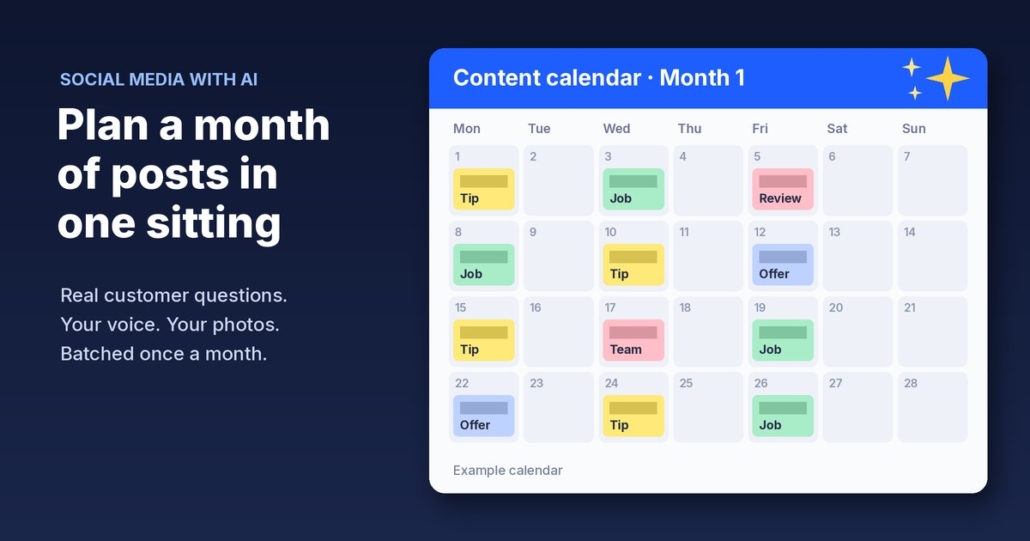
A list of ideas is useful. A calendar is what actually gets posted. Decide how often you can realistically post. For most small businesses, two or three posts a week is plenty, and consistent beats frequent every time.
A simple mix for the month
Here’s an example mix for 12 posts a month (three a week). Adjust it to suit your business:
- 4 helpful posts: answer a common customer question.
- 4 behind-the-scenes posts: a recent job, your team, how you do things.
- 2 trust posts: a real review (with the customer’s permission) or how you handle problems.
- 2 offer or reminder posts: a seasonal service, booking reminder or how to get a quote.
The calendar prompt
“Using the post ideas above, create a social media calendar for [month] with three posts a week on Monday, Wednesday and Friday. Mix it as 4 helpful, 4 behind-the-scenes, 2 trust and 2 offer posts. Take into account [any seasonal events, public holidays or busy periods for my business]. Show it as a table with the date, post type, topic, a one-line hook and what photo I’d need.”
That last column matters. It gives you a shot list for the month, so you know what to photograph on your next few jobs.
Step 3: Get the AI writing in your voice
Generic AI posts are easy to spot. They’re full of words like “elevate” and “unlock”, and they read like they could be from any business in the country. The fix is to show the AI how you actually write.
Feed it your best past posts
Find five to ten posts you’ve written that got a good response or just sound like you. Paste them in and say:
“These are posts I’ve written for my business. Describe my writing style in a few bullet points: tone, sentence length, words I use, how I start and end posts. Then write the posts in the calendar above in that style. Keep each one under 120 words, use Australian English, no hashtag spam (three at most), no emojis unless I use them in my examples. Don’t make up prices, timeframes, stats, results or customer quotes. If a post needs a detail you don’t have, write [ADD DETAIL] instead.”
Save that style description so next month you can paste it straight in, or add it to a ChatGPT or Claude project.
Example: a landscaping business
Say you run a landscaping business in Brisbane. One of your helpful posts might come from the question “When’s the best time to lay new turf?” The AI drafts a short post in your voice, explains the general answer you’ve given in your notes and ends with “Planning a new lawn? Send us a message for a quote.” You check it, add a photo of a recent turf job and it’s done. This is an illustration of the process, not a real client.
Always read before you post
Treat every AI draft as a first draft. Check facts, prices and anything that sounds like a promise. You know your business. The AI doesn’t.
Step 4: Use your own photos (and never fake results)
AI can write the words, but your photos are what make people trust you. Real photos of your work and team beat polished stock images for a local business.
Be careful with AI-generated images and AI-written “testimonials”. Under Australian Consumer Law, what you say in advertising has to be true. The ACCC’s guidance on false or misleading claims says information about your products and services must be accurate, truthful and based on reasonable grounds. It specifically covers images and descriptions of what’s offered and applies to social media and testimonials. Its page on online reviews is just as clear: it’s against the law for a business to create fake or misleading reviews or arrange for others to do so. This isn’t legal advice, but the practical rules are simple:
- Never use AI images to show work you didn’t do or “before and after” results that aren’t real.
- Never let AI write a customer quote. Only share real reviews, word for word, with permission.
- Don’t post numbers or results you can’t back up.
- Do use AI to help with captions, crop suggestions or ideas for what to photograph.
Build a photo habit
Use the shot list from your calendar. Ask your team to snap two or three photos on every job and drop them into a shared folder. In a month you’ll have more than enough.
Step 5: Batch it in one sitting each month
This is where it all comes together. Instead of thinking about social media every few days, block out one session a month. Somewhere around 90 minutes is a sensible target once you’ve done it a couple of times, although your first month will take longer while you set up the prompts.
A batching session, step by step
- Gather your inputs (15 minutes): new reviews, questions from the last month and your photo folder.
- Generate ideas and the calendar (15 minutes): run the Step 1 and Step 2 prompts.
- Write the posts (20 minutes): run the voice prompt, then read and edit every draft.
- Match photos (15 minutes): pick a real photo for each post.
- Schedule (25 minutes): load everything into a scheduler. Meta Business Suite has a free planner for Facebook and Instagram, and many CRMs, including GoHighLevel, have a social planner built in.
The time estimates above are an example, not a promise. The point is that it becomes one job on the calendar instead of a weekly guilt trip.
If you’d like help with more than social media, the free Steal My AI Agents pack has ready-to-use agents for lead replies, follow-ups, review requests, onboarding, inbox triage and a weekly business review. It works with ChatGPT, Claude, Grokbot or any AI assistant.
What to do this week
- Copy your last 20 Google reviews and your most common customer questions into one document.
- Run the Step 1 prompt and pick 12 ideas you like.
- Find five past posts that sound like you and run the voice prompt.
- Book 90 minutes in your calendar for the first batching session.
- Ask your team to start taking photos on every job.
Don’t aim for perfect. A month of genuine, useful posts in your voice beats the occasional burst of polish.
FAQ
Can AI write social media posts for my small business?
Yes. AI assistants like ChatGPT, Claude and Grokbot are good at turning your ideas, customer questions and notes into short posts. Give them examples of your past posts so they match your voice, and always read and edit each draft before it goes live.
How many social media posts should a small business plan each month?
Pick a number you can keep up. For most small businesses, two or three posts a week (around 8 to 12 a month) is a realistic target. Posting consistently matters more than posting a lot.
Is it OK to use AI-generated images in my posts?
Use your own photos for anything showing your work, team or results. Australian Consumer Law requires advertising, including images and social media, to be accurate, so never use AI images to show work you didn’t do or results that aren’t real.
How do I stop AI posts sounding generic?
Paste in five to ten of your own past posts and ask the AI to describe your style, then write in it. Ban words you’d never use, keep posts short, and add local details only you know, like suburbs you work in or questions customers actually ask.
Want social media (and more) off your plate?
Book a free AI audit and we’ll look at where AI can save you the most time, from social posts to lead replies and follow-ups. Want to start straight away? Grab the free Steal My AI Agents pack: ready-to-use agents for lead replies, follow-ups, reviews, onboarding, inbox triage and a weekly business review. Works with ChatGPT, Claude, Grokbot or any AI assistant.