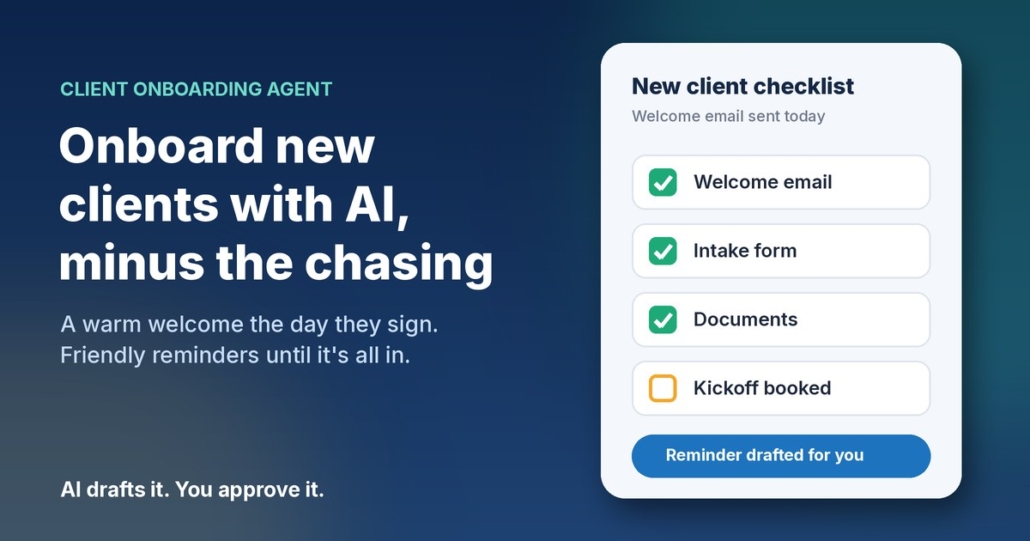
You’ve just won a new client. The proposal’s signed, everyone’s keen, and now comes the bit nobody enjoys: the welcome email, the intake form, the list of documents you need, the kickoff call to book. Then a week later you realise half of it never came back, and you’re writing “just following up on those documents” for the third time.
Onboarding is one of those jobs that’s the same every single time, which is exactly why it slips. It’s not hard work. It’s just a lot of small steps that depend on you remembering them while you’re busy doing the actual work.
In this post I’ll walk you through a simple client onboarding agent for a small business: a personal welcome the moment someone signs, a checklist that tracks what’s still missing, and polite reminders until everything’s in. You can run it with ChatGPT, Claude, Grokbot or any AI assistant, and you stay in control of every message.
Where onboarding usually breaks down
When I look at how small businesses bring on new clients (or new staff), the problems are nearly always the same:
- The welcome is slow. The client signs on Friday and hears nothing until Tuesday. That’s the moment they’re most excited, and it goes quiet.
- The information is scattered. The form link is in one email, the document list in another, the booking link in a text message.
- Nobody knows what’s outstanding. Did they send the signed agreement? Did they book the kickoff? You have to go digging to find out.
- Chasing feels awkward. So it gets put off, the project starts late, and the client wonders why things are slow.
None of these need a big new system to fix. They need one clear welcome message, one simple checklist, and someone (or something) that checks the list every couple of days.
What an AI onboarding agent actually does
The client onboarding agent in my free AI agents pack has four jobs:
- Notices a new client. That might be a signed proposal, a new deal in your CRM, a form submission, or simply you adding a row to a spreadsheet.
- Drafts a personal welcome that explains the next three steps, lists the documents you need, and includes your intake form and kickoff booking links.
- Adds them to a checklist so you can see at a glance what’s done and what isn’t.
- Chases what’s missing every couple of days with a short, friendly reminder, then tells you when everything is complete.
It works just as well for new hires as for new clients. Agencies, recruitment and staffing businesses, allied health practices, accountants and trades with a repeatable process all get a lot out of it.
The welcome: three steps, one email
A good welcome email is short and does one thing: makes it obvious what happens next. Something like:
Hi Priya, welcome aboard, and thanks for choosing Example Studio. Here’s what happens next:
1. Fill in our quick intake form (about 10 minutes): [form link]
2. Send through your logo files and your brand guide, if you have one.
3. Book your kickoff call at a time that suits: [booking link]Once those are in, we’ll get started. Any questions, just reply to this email. Mike
Everything they need is in one place, in order, with links. No digging through old emails.
The reminder: short, specific, helpful
If something’s still missing after a couple of days, the reminder should name exactly what’s outstanding and include the link again:
Hi Priya, just a quick one. We’ve got your intake form, thanks! The only things left are your logo files and booking the kickoff call: [booking link]. Reply here if you’d like a hand with either.
Because the reminder only lists what’s actually missing, it feels helpful rather than naggy. That’s the difference between “just following up” and “here’s the one thing left”.
How to set it up in about 30 minutes
Step 1: Write down your onboarding steps
Before you touch any AI tool, list what a new client needs to do and what you need from them. For most businesses it’s three to five things: a form, a few documents, a signed agreement and a kickoff booking. If you can’t list it, the AI can’t either.
Step 2: Make a simple checklist sheet
A Google Sheet or Excel file is plenty. Use columns for name, email, form done, documents done, kickoff booked, and the date they were added. A yes or no in each column is all you need. If your form tool or booking tool can update the sheet automatically, great. If not, ticking a box yourself takes seconds.
Step 3: Give your AI assistant a clear brief
Open ChatGPT, Claude, Grokbot or any AI assistant and paste in a brief like this, filled in with your details:
You are the onboarding coordinator for [business name]. When I give you a new client’s first name and what they’ve signed up for, write a warm welcome email (no more than 150 words, Australian English) that lists what happens next in three steps, the documents we need: [document list], our intake form link: [form link], and our kickoff booking link: [booking link]. Sound friendly and down to earth. Don’t promise timeframes or results I haven’t given you.
Then add a second brief for reminders:
Write a polite reminder of about 40 words from [business name] that lists only the onboarding items still missing, with their links, and offers help if they’re stuck.
Paste in a welcome email you’ve sent before as an example, so the drafts sound like you rather than a robot.
Step 4: Draft, approve, send
When a new client signs, give the assistant their name and package and ask for the welcome. Read it, tweak anything that doesn’t sound right, and send it. Every couple of days, check the sheet, paste in who’s missing what, and ask for the reminders. It’s a few minutes of work instead of half an hour of writing from scratch.
Step 5: Automate once you trust it
Once you’ve approved a few rounds of drafts and you’re happy with them, you can connect the steps so they run on their own: a new row triggers the welcome, the sheet is checked on a schedule, and reminders go out for anything still marked “no”. The pack walks you through this. But start with approving every message. You’ll learn quickly what your clients actually get stuck on.
Keep client information safe
Onboarding often involves personal details and documents, so a little care goes a long way.
The Office of the Australian Information Commissioner’s Australian Privacy Principles quick reference sums up the basics. APP 11 says businesses covered by the Privacy Act must take reasonable steps to protect the personal information they hold from misuse, loss and unauthorised access, and APP 10 is about keeping that information accurate and up to date. Even if you’re not sure the Act applies to your business, they’re a sensible standard to follow.
The OAIC also has guidance on privacy and the use of commercially available AI products, which recommends being cautious about putting personal information, especially sensitive information, into public AI tools.
In practice, that means:
- Give the AI only what it needs. A first name and the package they bought is enough to write a welcome. It doesn’t need their tax file number, health details or bank information.
- Collect documents through a proper channel, like a secure upload form or your practice software, not by pasting them into a chat.
- Keep the checklist sheet private and only share it with the people who need it.
This isn’t legal advice. If you handle health, financial or other sensitive information, check what applies to you with someone qualified.
What good onboarding gets you
The obvious win is time: no more writing welcome emails from scratch or keeping a mental list of who owes you what. But the bigger win is how the client feels. A clear, fast, organised welcome tells them they made the right call, before you’ve even started the work.
And because the agent tells you when everything’s in, you know exactly when a project is ready to start. No more kickoff calls where you realise you’re still waiting on the one file you needed most.
Frequently asked questions
Do I need special software to automate client onboarding?
No. A spreadsheet, your email and an AI assistant are enough to start. You can connect your form, booking tool or CRM later once the process is working.
How often should I send onboarding reminders?
Every couple of days is a good rhythm. Only list the items that are still missing, include the links again, and offer help. If someone still hasn’t responded after a few reminders, give them a call instead.
Can I use the same agent for onboarding new staff?
Yes. Swap the client steps for your new-hire steps, such as signing their contract, filling in their details and booking their first-day induction. The welcome and reminder briefs work the same way.
Is it safe to put client details into ChatGPT or other AI tools?
Keep it to the minimum. The OAIC recommends caution about entering personal information, particularly sensitive information, into publicly available AI tools. A first name and the service they bought is all the AI needs to write a welcome.
Which AI tool should I use?
Whichever one you already use. The briefs above work in ChatGPT, Claude, Grokbot or any AI assistant. Your clear steps and example emails matter far more than the brand of tool.
Get my AI agents (free)
My free Steal My AI Agents pack includes the client onboarding agent, plus agents for instant lead replies, follow-ups, reviews and inbox triage, with the prompts and setup steps. It works with ChatGPT, Claude, Grokbot or any AI assistant. No code needed.
Rather have it set up for you? Book a free AI audit.