Most sales calls don’t fall apart because you don’t know your product. They fall apart because you walked in cold. You skimmed the lead form on the way to the Zoom link, forgot what they said three weeks ago, and spent the first ten minutes reconstructing context instead of listening. The prospect notices. You feel it too.
In this post I’ll show you a simple way to prep for a sales call with AI. You take the notes you already have — the form fill, the last email, a LinkedIn bio, a past call summary — and ask your assistant to draft a research brief, an agenda and likely objections. You check every line. You stay in control of what you send and what you say. It works with ChatGPT, Claude, Grokbot or any AI assistant you already use.
Why sales call prep gets skipped
In a small business, the person on the call is often also the person who wrote the quote, answered the inbox and ran the last delivery. Prep gets squeezed. Common shortcuts:
- Open the CRM two minutes before the call and hope the last note is useful
- Re-read the original enquiry and nothing else
- Wing it because “we’ve spoken before”
- Skip prep entirely when the calendar is packed
None of that is laziness. It’s load. The fix isn’t a longer prep ritual — it’s a short, repeatable one that turns scattered notes into something you can actually use in five minutes.
What “good” prep looks like
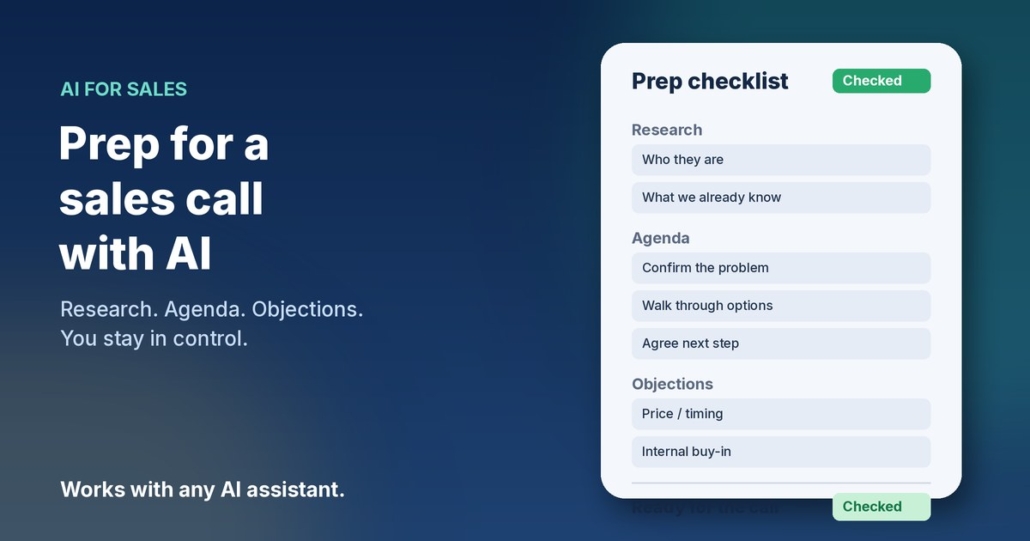
Before a sales or discovery call, you want one page (or less) that covers four things:
- Who they are — company, role, what they do, why they reached out
- What we already know — past emails, quotes, open issues, promises made
- Agenda — three to five topics you’ll cover, in order
- Likely objections — price, timing, fit, internal buy-in — with plain-English responses you can adapt
If you have that, you walk in calm. You listen better because you’re not hunting for context mid-call. AI is good at assembling this shape from messy input. You are good at checking that nothing was invented and that the tone matches how you actually talk.
How to prep for a sales call with AI
Step 1: Gather what you already have
Don’t start researching the whole internet. Start with public or first-party notes you already own:
- The original enquiry or form submission
- Email or chat thread so far
- CRM notes and any past quotes (see keep your CRM up to date with AI)
- A public company About page or LinkedIn profile you’ve already looked at
- Notes from a previous call, if you have them (related: turn meeting notes into actions with AI)
Paste only what you need. Strip passwords, private account numbers and anything personal that isn’t required for the call. The goal is a clean brief, not a data dump.
Step 2: Ask for a research brief — not a novel
Open ChatGPT, Claude, Grokbot or whichever assistant you use, and paste your notes with a prompt like this:
“You’re helping me prep for a sales / discovery call for my small Australian business. Below are notes I already have about the prospect (enquiry, emails, CRM notes, public bio). Produce a one-page prep brief with: 1) Who they are (2–4 sentences), 2) What we already know / promised, 3) Open questions I still need answered on the call, 4) Suggested agenda (3–5 items), 5) Likely objections with a short plain-English response I can adapt. Use Australian English. Do not invent company facts, stats, testimonials or results I didn’t provide. If something is missing, mark it as Unknown. End with a 5-bullet ‘walk-in checklist’.”
That “Unknown” rule matters. A tidy brief full of guesses is worse than a short brief with honest gaps.
Step 3: Check every claim before you rely on it
AI will happily fill holes. Read the draft and check:
- Did it invent a company size, revenue figure or industry claim?
- Did it turn a maybe into a promise you supposedly made?
- Are the objections grounded in what they actually said, or generic filler?
- Is anything confidential that shouldn’t sit in this chat?
Fix those, then ask: “Update the brief with my corrections. Keep the same five sections. Don’t add new facts.”
Step 4: Lock the agenda and objection notes
Copy the agenda into your calendar invite notes or a sticky you keep beside the screen. Keep objection responses as bullet prompts, not scripts — you want to sound like yourself, not a brochure. If a quote is likely to come next, have your numbers ready; for faster quoting after the call, see write quotes faster with AI.
Step 5: After the call, close the loop the same day
Prep is half the job. Within an hour of hanging up, dump a short voice note or bullets into your assistant: what they said, what you promised, next step with date. Update the CRM. Send the follow-up while the call is still warm — related reading: follow up leads with AI.
“From these post-call notes, list: pain points confirmed, what I promised to send, next step with owner and date, and anything still unclear before I quote. Don’t invent numbers or commitments.”
A fuller prompt you can save
Once you’ve done this a few times, save a reusable prep prompt so you’re not rewriting it every call:
“Role: sales-call prep assistant for a small Australian business. Input: enquiry, emails, CRM notes and any public bio I provide. Output only: Who they are | What we already know / promised | Open questions for the call | Agenda (3–5 items) | Likely objections with short adaptable responses | Walk-in checklist (5 bullets). Rules: plain Australian English; never invent company facts, stats, quotes, testimonials or results; mark missing facts as Unknown; flag anything that looks like personal or sensitive data so I can remove it before sharing. Ask me up to three clarifying questions only if a promised next step or decision-maker is genuinely ambiguous.”
Paste that once at the top of a chat, then drop each prospect’s notes underneath. Same structure every time means your prep stays short and scannable.
Prompts for common call types
- First discovery call: “From this enquiry and email thread, draft who they are, what problem they named, open questions, a 4-item agenda, and three likely objections. Mark unknowns. Don’t invent budget.”
- Quote review call: “Using the quote notes and their last email, list what they liked, what they pushed back on, open questions, and a short agenda focused on deciding next steps. Don’t invent discounts.”
- Renewal / upsell chat: “From CRM notes and recent support emails, summarise current relationship, open issues, what we’ve delivered that they valued (only from my notes), and likely concerns about renewing.”
- Partner / referral intro: “From the referrer’s note and the prospect’s public bio, draft a short who-they-are, why they were referred, open questions, and a light agenda. Don’t invent the referral reason.”
- Re-engage cold lead: “From the old enquiry and last contact date, summarise what they asked for then, what might have changed (Unknown if not said), and a short re-intro agenda. Don’t invent why they went quiet.”
What to leave out of the AI chat
Sales notes often include things that shouldn’t go into a general AI tool. Before you paste:
- Strip passwords, one-time codes and private account details
- Remove home addresses, health notes, payroll or bank details you don’t need for the brief
- Don’t paste full contracts just to extract “next meeting Tuesday”
- Use initials or project codes when a full name isn’t required
For Australian businesses, the Office of the Australian Information Commissioner (OAIC) publishes practical guidance on using commercially available AI products with personal information — worth a read before you make this a team habit: OAIC guidance on privacy and commercially available AI products. When in doubt, keep the AI input to business context and leave sensitive detail in your own systems.
Make prep a habit, not a scramble
The workflow only pays off if you do it every time. A simple rule that works for most owners:
- Block five to ten minutes before every sales or discovery call
- Paste what you already have into your saved prep prompt
- Check the brief — especially Unknowns and objections — then walk in
- After the call, capture notes and send the follow-up the same day
- Once a week, skim open next-steps in your CRM or task list and chase what’s still hanging
If the same objections keep showing up, that’s useful product feedback — not just sales noise. Capture them and review in your weekly ops pass.
Frequently asked questions
Do I need to scrape the prospect’s whole website?
No. Start with what you already have. A public About page or LinkedIn bio you’ve already opened is enough. More data isn’t better if it invents a story you then believe.
Which AI assistant should I use?
Any of the main ones will do — ChatGPT, Claude, Grokbot or another assistant you’re already comfortable with. The prompt and your check matter more than the brand.
What if I have almost no notes on the prospect?
Say so in the prompt and ask for an agenda and open questions only. Mark company facts as Unknown. A short honest brief beats a long invented one.
Should I read the AI script word-for-word on the call?
No. Use the agenda and objection bullets as prompts. Talk like yourself. Scripts sound like scripts.
Is it okay to paste client names into the AI tool?
Be careful. For many tools, treat anything you paste as data you wouldn’t mind a third party processing. Use initials or project codes when you can, strip personal details, and follow the OAIC guidance linked above. When the notes are sensitive, keep the AI step on a tool your business has reviewed.
Can my team use the same prep prompt?
Yes — and they should. Save the fuller prompt in a shared doc so every call brief looks the same. Consistency makes handovers easier and stops prep quality depending on who is free that hour.
Want this running as a repeatable habit?
If you’d like help mapping which calls are worth prepping this way, and which other admin AI can take off your plate, book an AI audit and we’ll walk through it together. Or, if you’d rather start yourself, grab the AI agents pack. It works with ChatGPT, Claude, Grokbot or any AI assistant, and you can have your first agent running this week.