Posts

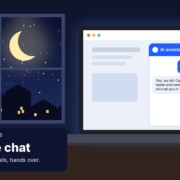
AI website chat for small business illustration: a laptop at night showing an example chat where an AI assistant answers a 9:47 pm enquiry and shows Details captured, with a crescent moon outside the window

Here’s a pattern I see in a lot of small businesses. Someone finds your website at 9:30 on a Tuesday night, likes what they see and sends an enquiry. Nobody’s at the desk, so it sits there. By the time you open it at 7am, they’ve also enquired with two other businesses, and one of them got back to them first.

You can’t be on call 24/7, and you shouldn’t have to be. This is a job an AI website chat handles well: answering the common questions, collecting the details and lining up the next step, so the enquiry is warm and ready when you start work. In this post I’ll show you what a good AI website chat should and shouldn’t do, what to feed it, how the handover works next morning, and how to test it before it goes anywhere near a real customer.

What happens to an enquiry that sits until morning

I’m not going to throw a made-up statistic at you here. Just think about how you shop for a service yourself. When you need a plumber, a bookkeeper or a physio, you rarely contact just one. You send a few enquiries, and the business that replies first with something useful has a head start.

After hours is when a lot of people finally get time to sort out their life admin: kids are in bed, work is done, and they’re browsing on the couch. If your website can only offer a contact form and silence until morning, you’re relying on that person still being keen the next day, and still remembering which website was yours.

I covered the daytime side of this in how to reply to every enquiry fast with AI. After-hours chat is the same idea, for the hours when nobody can reply at all.

What an AI website chat should do (and what it shouldn’t)

The biggest mistake I see is giving a chat bot too much freedom. A good AI website chat has a narrow, clear job. Think of it as a friendly front desk person on their first week: helpful, polite, and very clear about what they can and can’t promise.

Jobs to give it

  • Answer common questions using your own information: services, service area, opening hours, how bookings work, what to expect at a first visit.
  • Collect the details you’d ask for anyway: name, contact details, suburb, what they need and how urgent it is.
  • Offer the next step, such as a booking link for a call, or a clear “we’ll be in touch tomorrow morning”.

Jobs to keep away from it

  • Quoting prices it hasn’t been given, or estimating a job it can’t see.
  • Making promises about availability, timeframes, refunds or results.
  • Advice that needs a qualified person: medical, legal, financial or safety questions.
  • Handling complaints beyond acknowledging them and passing them to a human.

Why be this strict? Because what your chat says, you’ve said. There’s a well-known case from Canada, Moffatt v. Air Canada (2024 BCCRT 149), where the airline’s website chatbot told a customer he could apply for a bereavement fare after travelling. That wasn’t the airline’s policy. The British Columbia Civil Resolution Tribunal found the airline responsible for what its chatbot said and ordered it to pay the difference. It’s a Canadian decision, not Australian law, but the lesson travels: if your chat makes it up, customers will hold you to it.

Tell people they’re talking to AI

Don’t dress your chat up as a person. Label it clearly as an AI assistant. The Office of the Australian Information Commissioner’s guidance on privacy and the use of commercially available AI products says businesses should make sure public-facing AI tools, such as chatbots, are clearly identified as such, and that privacy policies explain how AI is used. Being upfront also builds trust. Most people are fine chatting with AI at 10pm as long as they know a real person will follow up.

Feeding it your services, area, hours and FAQs

An AI chat is only as good as the information you give it. If you feed it nothing, it will guess, and guessing is exactly what you don’t want. Before you switch anything on, put together a one-page “knowledge sheet” in plain English.

What goes on the knowledge sheet

  • Services: what you do and, just as important, what you don’t do
  • Service area: the suburbs or regions you cover, and what happens if someone’s outside it
  • Hours: when a human will reply, so the chat can set honest expectations
  • Pricing rules: only what you’re happy to say publicly, such as “call-out fee from $X” or “we quote after a site visit”
  • Your top 10 to 15 questions, with the answers you’d give on the phone
  • Hard rules: “never quote a price not listed here”, “never promise a time”, “if it’s an emergency, give this number”

Not sure what your top questions are? Your inbox and your team already know. My post on building a team FAQ from real customer questions with AI walks through pulling them out of old emails and messages, and that same FAQ becomes the brain of your website chat.

A simple instruction block

Whatever chat tool you use, it will have somewhere to put instructions. Here’s an example you can adapt:

You are the AI assistant on [Business]’s website. You are an AI, and you say so if asked. Answer only using the information below. If you don’t know, say a team member will reply during business hours. Never quote a price, timeframe or availability that isn’t listed. Your goal is to help, then collect the person’s name, phone or email, suburb and what they need. Keep replies short, friendly and in Australian English. If someone mentions an emergency, give them [emergency number] straight away.

The handover: how a person picks it up next morning

An after-hours chat is only half the job. The other half is what happens at 7am. If the details land in an inbox nobody checks until lunchtime, you’ve lost most of the benefit.

Make the summary easy to act on

Set the chat up so every conversation ends with a short summary sent to wherever your team actually looks: email, your CRM or a shared inbox. A good summary has:

  • Name and contact details
  • What they need, in one or two lines
  • Urgency and suburb
  • Any questions the chat couldn’t answer
  • What the customer was told would happen next

Give someone the morning job

Decide who works through overnight enquiries first thing, and by when. Even a simple rule like “every overnight chat gets a personal reply before 9am” makes a huge difference. That reply should come from a human and pick up where the chat left off, so the customer never has to repeat themselves.

If you want the follow-up to happen even when that first reply gets no response, that’s where an Instant Lead Reply and a follow-up routine come in. Both are in my free Steal My AI Agents pack, written as plain-English instructions that work with ChatGPT, Claude, Grokbot or any AI assistant.

Test it like a customer before it goes live

Never switch a chat on without trying to break it first. Spend 30 minutes being your own trickiest customer. Get a team member to have a go too.

Questions to throw at it

  • “How much does it cost?” (Does it stick to your pricing rules?)
  • “Can you come tomorrow at 8am?” (Does it avoid promising a time?)
  • “Do you service [suburb outside your area]?”
  • “Is this safe to fix myself?” (Does it avoid advice it shouldn’t give?)
  • “Am I talking to a real person?”
  • A grumpy complaint about a past job

Every time it gets something wrong, fix the knowledge sheet or the rules, then test again. Keep testing for the first couple of weeks after launch too: read every conversation, note anything odd and tighten it up. It’s also worth checking what customer details the chat tool stores and who can access them. My post on whether AI is safe for small business covers what to look for.

What to do this week

  1. Check your after-hours gap. Look at when your last 20 enquiries arrived and how long each waited for a reply.
  2. Write your knowledge sheet. Services, area, hours, pricing rules, top questions and hard rules, on one page.
  3. Set up the handover. Decide where summaries land and who replies first thing each morning.
  4. Test it hard. Run through the question list above and fix anything it gets wrong.
  5. Review weekly. Read the conversations, add new questions to your FAQ and adjust the rules.

Done well, an AI website chat doesn’t replace you. It keeps the conversation going while you’re off the clock, so you start each morning with warm enquiries instead of cold ones. If you’d rather have one built and looked after for you, that’s exactly what we do at WebsiteChat.

FAQ

Can an AI website chat answer enquiries after hours?

Yes. A well set-up AI website chat can answer common questions, collect the customer’s details and offer the next step at any hour. A person then picks up the conversation during business hours.

Will an AI chat give customers the wrong information?

It can if you leave it to guess. Give it a clear knowledge sheet, tell it to answer only from that information, and set hard rules about prices, timeframes and advice. Then test it and read the conversations regularly.

Should I tell customers they’re chatting with AI?

Yes. Label it clearly as an AI assistant. The OAIC’s guidance on commercially available AI products says public-facing AI tools such as chatbots should be clearly identified, and being upfront builds trust.

Can the chat quote prices or book jobs?

Only within rules you set. It can share pricing you’re happy to publish and offer a booking link, but leave custom quotes, availability promises and anything needing judgement to a person.

Do I need a developer to add AI chat to my website?

Not always. Many chat tools can be set up without code, but the knowledge sheet, rules, handover and testing are what make it work. If you’d rather not do it yourself, a free AI audit is a good place to start.

Stop losing the enquiries that arrive after hours

Grab the free Steal My AI Agents pack: ready-to-use agents for lead replies, follow-ups, reviews, onboarding, inbox triage and a weekly business review. Works with ChatGPT, Claude, Grokbot or any AI assistant. Want help working out where your enquiries are slipping through? Book a free AI audit.
Get the free AI agents pack or book a free AI audit

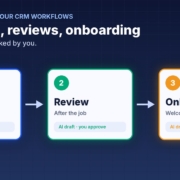
GoHighLevel AI automation illustration: a simple three-step workflow diagram with Follow-up, Review and Onboard nodes joined by arrows, each labelled AI draft, you approve

A lot of small businesses I talk to are paying for GoHighLevel every month and using a fraction of it. The pipeline is there, the calendars are there, the workflow builder is there. But the follow-up sequences never got written, the review requests go out when someone remembers, and new clients still get a welcome email typed from scratch.

That’s not a software problem. It’s a writing and setup problem, and that’s exactly where AI helps. In this post I’ll walk you through why GHL accounts stay half set up, then three jobs you can hand to AI first: follow-up sequences, review requests after the job, and a client onboarding checklist. Then I’ll show you how to test it all before you switch anything on.

Quick note: I’m independent and not affiliated with or endorsed by HighLevel. GoHighLevel and HighLevel are trademarks of their owner.

Why GoHighLevel accounts stay half set up

GoHighLevel can do a lot. That’s the selling point, and it’s also the problem. When a tool can do everything, someone has to decide what it should do for your business, write the words, build the steps and keep them up to date. In most small businesses, that someone is the owner, and the owner is busy running the business.

Here’s what I usually see when I open up an account:

  • Empty or default workflows. The account was set up by an agency or a course template, and nobody has touched the workflows since.
  • Generic messages. The follow-up texts that do exist were written for “any business”, so they don’t sound like you and customers can tell.
  • Stages nobody uses. The pipeline has stages, but jobs don’t get moved, so any automation tied to those stages never fires.
  • Fear of breaking something. Owners worry that if they switch a workflow on, it’ll spam their customer list. So they leave it off.

The good news: the hardest part of all of this is the writing and the thinking, and AI is very good at both. You can get the words and the logic drafted in an afternoon, then put them into GHL piece by piece.

HighLevel has its own AI too

It’s worth knowing what’s already built in. HighLevel’s support portal describes a Workflow AI Builder that turns a plain-language prompt into a workflow you then review and refine, and Conversation AI bots that can collect lead details, answer common questions and help with booking. HighLevel’s own guide says generated workflows need a manual review before you publish them, which is good advice for any AI setup. Features and pricing depend on your plan, so check your account before you rely on them.

Whether you use HighLevel’s built-in AI or an outside assistant like ChatGPT, Claude or Grokbot, the same rule applies: you still need to know what you want it to say and when. That’s what the rest of this post is about.

Job 1: AI-written follow-up sequences

Most quotes and enquiries that go cold weren’t lost. Nobody followed up. A follow-up sequence in GHL fixes that, but only if the messages are good enough that you’re happy for them to go out.

Decide the cadence first

Keep it simple. A day 1, day 3 and day 7 rhythm works for a lot of service businesses: a quick check-in, a helpful nudge, then a polite last message that makes it easy to say no. Write down when the sequence should stop, for example as soon as the person replies, books, or says they’ve gone elsewhere.

Get AI to draft the messages in your voice

Give your AI assistant three or four real messages you’ve sent before, a short description of your business and your service area, and the cadence. Ask it to write each message for SMS and email, short and friendly, with one clear next step. Then edit them until they sound like you. I cover the tone side in more detail in my post on how to follow up leads with AI without being pushy.

Personalise with the fields you already have

GHL lets you insert contact fields into messages. Ask the AI to use the ones you actually fill in, such as first name, service type and suburb. A follow-up that mentions “the bathroom quote in Ashgrove” lands very differently to “your recent enquiry”. (That’s an example, not a real customer.)

Job 2: Review requests after the job

Happy customers rarely leave a review unless you ask, and asking feels awkward. A simple automated request, sent at the right moment, takes the awkwardness out of it.

Trigger it on the win

Tie the request to a clear moment, such as a job being marked complete or an invoice being paid. If your pipeline stages aren’t kept up to date, fix that first, or the request will go out at the wrong time or not at all.

Write a short, personal ask

Ask the AI for a two or three line message that thanks the customer for something specific, then gives them the link. No pressure, no incentives, no long story. Ask for a second version for the reminder a few days later, and stop after that.

Ask everyone, not just the happy ones

Don’t set up a workflow that only sends the review link to people who rate you highly and sends everyone else somewhere else. That’s called review gating and it goes against Google’s review policies. Ask every customer, and handle any complaints that come back as a person, not a bot. My post on getting more Google reviews with AI goes through this step by step.

Job 3: A client onboarding checklist

When a deal is won, the next few days set the tone for the whole relationship. If onboarding happens in your head, things get missed: the access you needed, the forms they never filled in, the kick-off call nobody booked.

Write the checklist once

Tell your AI assistant what happens after someone says yes in your business, even in rough dot points. Ask it to turn that into a clean checklist with three parts: what the client needs to send you, what your team needs to do, and when each step should happen. You only have to do this once.

Turn it into messages and tasks

From that checklist, get the AI to draft the welcome email, a short reminder for anything the client hasn’t sent yet, and the internal tasks for your team. In GHL, these can hang off the “won” stage: the welcome goes out, tasks are created and assigned, and a reminder follows if a form is still missing. For more on this, see how to onboard new clients with AI.

Test everything before you switch it on

This is the step most people skip, and it’s the one that stops the “what if it spams everyone” fear from coming true.

Use a test contact

Create a contact with your own mobile and email, and run them through every workflow. Read every message as if you were the customer. Check the timing, the personalisation fields and the links.

Check the stop rules

Reply to a follow-up as your test contact and make sure the sequence stops. Move the test deal to won and check the follow-up ends and onboarding starts. These are the bits that cause the most embarrassment when they’re wrong.

Start small

Switch on one workflow for new contacts only, not your whole list. Watch it for a week. Look at what went out, what people replied and anything that looked off, then fix the wording or the logic before you add the next one.

Keep a person in the loop for the tricky stuff

Decide what must always go to a human: pricing questions, complaints, anything legal or sensitive. If you’re unsure about the data side, my post on whether AI is safe for small business covers what to check.

What to do this week

  1. Pick one job. Follow-up, reviews or onboarding. Choose the one that costs you the most work today.
  2. Write your rules in plain English. Your services, area, tone, cadence and what always goes to a person.
  3. Get AI to draft the messages. Use your own past messages as examples, then edit until they sound like you.
  4. Build it in GHL and test it on yourself. One workflow, one test contact, every message read end to end.
  5. Switch it on for new contacts only. Review after a week, then add the next job.

If you’d rather start with the instructions already written, the free CRM agent pack for GoHighLevel gives you AI agents for lead replies, follow-ups and pipeline updates. They’re plain-English instructions that work with ChatGPT, Claude, Grokbot or any AI assistant, so there’s nothing to install.

FAQ

Do I need to know how to build workflows to use AI with GoHighLevel?

No. AI can draft the messages and describe the steps in plain English, and HighLevel’s own Workflow AI Builder can turn a prompt into a workflow. You still need to review every step and test it before you switch it on.

Will AI send messages to my customers without me checking?

Only if you set it up that way. Start by testing every workflow on your own contact, switch it on for new contacts only, and keep pricing, complaints and anything sensitive with a person.

Can I only send review requests to happy customers?

No. Filtering out unhappy customers before asking for a review is called review gating and goes against Google’s review policies. Ask every customer and handle complaints personally.

Should I use HighLevel’s built-in AI or ChatGPT, Claude or Grokbot?

Either can work. Many businesses draft messages and checklists in their usual AI assistant, then build them in GHL. Check what your HighLevel plan includes before relying on its built-in AI features.

What’s the best first job to automate in GoHighLevel?

Whichever one loses you the most work today. For many service businesses that’s quote follow-up, because the leads are already in the pipeline and just need a nudge.

Make GoHighLevel finally run itself

Grab the free CRM agent pack: AI agents for lead replies, follow-ups and pipeline updates, with no weekend workflow building. Prefer a hand? Book a free 15-minute AI workflow audit and we’ll find your first quick win.

Get the free CRM agent pack or book a free AI audit

Independent AI agents. Not affiliated with or endorsed by HighLevel.

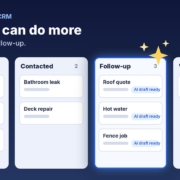
HubSpot AI agents illustration: a generic CRM pipeline board with New lead, Contacted, Follow-up and Won columns, where the Follow-up column glows with an AI sparkle and AI draft ready labels

If you’re paying for HubSpot every month and still typing notes after every call, chasing quotes from memory and onboarding new clients with a copy-pasted email, you’re not alone. A CRM is only as good as what goes into it, and for most small businesses the bit that goes in is the bit nobody has time for.

The good news is you don’t need a bigger plan or a new system to fix it. You can hand the repetitive writing and chasing to AI agents and keep HubSpot as the place where everything lives. In this post I’ll show you what HubSpot already does well, where the gaps usually are, three jobs to give AI first, where the AI actually sits, and how to keep your data clean while you do it.

Quick note: I’m independent and not affiliated with or endorsed by HubSpot. HubSpot is a trademark of HubSpot, Inc.

What HubSpot does well (and where the gaps are)

HubSpot is very good at being the single source of truth for your contacts, deals and conversations. You can see who enquired, what stage their deal is at, which emails they opened and who on your team is responsible. For a small business, that alone is a big step up from a spreadsheet and a full inbox.

HubSpot also has its own AI now. Its Breeze Assistant page says Breeze Assistant is included with every HubSpot subscription at no extra cost, and its AI agents page describes pre-built agents and an agent builder. Some of those features need a Starter, Professional or Enterprise subscription, and custom agents use HubSpot Credits, so check what your plan includes before you count on them.

So where are the gaps? In my experience they’re rarely about features. They’re about the work around the CRM:

  • Replies are slow. A new enquiry lands in HubSpot, but someone still has to write the first reply, and that person is on the tools or with a client.
  • Follow-up depends on memory. Quotes go out and nobody chases them, because the follow-up tasks pile up faster than anyone clears them.
  • Onboarding is ad hoc. Every new client gets a slightly different welcome, and the details you need from them arrive in dribs and drabs.
  • Records go stale. Notes don’t get logged, deal stages don’t get moved, and the pipeline report stops matching reality.

None of those are HubSpot problems. They’re time problems, and they’re exactly the sort of repetitive, text-heavy jobs AI is good at.

Three jobs to hand to AI first

Don’t try to automate your whole CRM in one go. Pick one of these, get it working, then add the next.

1. The first reply to a new lead

When a lead comes in, an AI agent can read the enquiry and draft a friendly, specific reply based on your services, service area and pricing rules. You check it and send it, or for simple enquiries you let it go out once you trust it. The reply then gets logged against the contact in HubSpot so everyone can see it.

The key is giving the agent good information: what you do and don’t do, the areas you cover, how you price, and when it must hand over to a person. I go into the details in my post on replying to every enquiry fast with AI.

2. Follow-up on quotes and quiet deals

Most deals that go cold weren’t lost. Nobody followed up. An AI agent can look at deals that have sat in the same stage for a few days and draft a short, personal follow-up using the notes on that deal. A simple cadence such as day 1, day 3 and day 7 works for a lot of businesses, and the agent should stop as soon as the person replies or says no.

Because the drafts come from the deal notes, they don’t read like a template. If you want the full approach, see how to follow up leads with AI without being pushy.

3. Onboarding new clients

When a deal moves to won, an AI agent can draft the welcome email, a checklist of what you need from the client, and the first few tasks for your team. It pulls the client’s name, the job and any special notes from the HubSpot record, so each welcome feels personal without you writing it from scratch.

Where the AI actually sits

This is the part that confuses people, so let me keep it simple. There are two common ways to set this up, and you can start with the first and move to the second later.

Option A: AI drafts, you paste into HubSpot

You keep your AI assistant open beside HubSpot. You paste in the enquiry or the deal notes, the assistant drafts the reply or follow-up, you check it and paste it into HubSpot to send or log. It sounds basic, but it’s the fastest way to start, it costs nothing extra, and you stay in full control of every message.

This is how the Steal My AI Agents pack works. Each agent is a set of plain-English instructions you load into ChatGPT, Claude, Grokbot or any AI assistant, so there’s nothing to install.

Option B: AI connected to HubSpot

Once the drafts are reliably good, you can connect the AI to HubSpot so it reads new records and writes notes, tasks or drafts straight back. That might be through HubSpot’s own agents, or an AI assistant that’s been given access to your account. Either way, the same rule applies: start with the agent creating drafts and tasks for a person to approve, and only let it act on its own once you’ve tested it on real examples.

Guardrails that apply either way

  • Decide what the AI may never send without a person checking it, such as pricing, complaints or anything legal.
  • Give it a clear hand-over rule: if it isn’t sure, it flags the record for a human.
  • Only give it access to the data it needs for the job.

If you’re weighing up the data side, my post on whether AI is safe for small business covers what to check.

Keeping your data clean

AI is only as good as the records it reads. If your contacts have no notes and your deal stages are a guess, the drafts will be generic. A few habits make a big difference:

Agree on your deal stages

Write down what each stage means in one line, for example “Quote sent: the quote has been emailed and we’re waiting on a yes or no”. When everyone uses the stages the same way, an agent can safely pick out the deals that need chasing.

Log a short note after every conversation

Even two lines helps: what they want, what you promised, and the next step. You can dictate a rough note and have AI tidy it into a clean summary before it goes into HubSpot. I cover this in how to keep your CRM up to date with AI.

Use the fields you already have

Service type, suburb and lead source are usually enough for an agent to personalise a message. Fill those in consistently before you add more custom fields.

Review weekly

Spend ten minutes a week looking at what the agent drafted and what actually went out. Fix the instructions when something’s off. That small habit is what turns a clever experiment into something your team relies on.

What to do this week

  1. Pick one job. First reply, follow-up or onboarding. Choose the one that costs you the most time or the most lost work.
  2. Write down your rules. Services, areas, pricing basics, tone, and what must always go to a person.
  3. Run it in your AI assistant for a week. Paste in real enquiries or deal notes, check every draft, and log what you send in HubSpot.
  4. Tidy the records it relies on. Agree on your deal stages and start logging short notes.
  5. Decide on the next step. If the drafts are consistently good, look at connecting the AI to HubSpot or adding the next job.

If you’d like the instructions already written, the free CRM agent pack for HubSpot gives you agents for lead replies, follow-ups and keeping records complete on the plan you already have.

FAQ

Do I need a higher HubSpot plan to use AI agents?

Not to get started. You can run AI agents in your own AI assistant and paste the results into HubSpot on any plan. HubSpot’s own agents and agent builder have their own plan and credit requirements, so check HubSpot’s pricing pages for your account.

Will AI send messages to my customers without me knowing?

Only if you set it up that way. Start with the AI creating drafts that a person checks and sends. Once you trust it on simple messages, you can decide which ones, if any, it may send on its own.

Is it safe to paste customer details into an AI assistant?

Use a business account with data controls switched on, share only what the job needs, and check the provider’s privacy settings. Avoid pasting sensitive information such as health or financial details unless your setup is approved for it.

Should I switch CRMs to get better AI?

Usually not. Switching costs time and money, and the gaps are rarely the CRM itself. Adding AI to the work around HubSpot, such as replies, follow-ups and notes, is normally the quicker win.

What’s the best first job to give AI in HubSpot?

Whichever one loses you the most work today. For many small businesses that’s following up quotes, because the deals are already in the pipeline and just need a nudge.

Get more out of HubSpot without upgrading

Grab the free CRM agent pack: AI agents for lead replies, follow-ups and complete records that work with the HubSpot plan you already have. Prefer a hand? Book a free 15-minute AI workflow audit and we’ll find your first quick win.

Get the free CRM agent pack or book a free AI audit

Independent AI agents. Not affiliated with or endorsed by HubSpot.

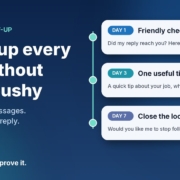
Illustration of a three-step follow-up timeline with day 1, day 3 and day 7 message cards and a green Replied: stop badge, next to the headline Follow up every lead without being pushy

Someone enquires. You reply. They say “thanks, I’ll have a think” or, more often, say nothing at all. And then life gets busy, and that lead quietly drifts off to whoever followed up next.

Most small business owners I talk to don’t lose work because their reply was bad. They lose it because there was no second message. Following up feels awkward, it’s easy to forget, and nobody wants to be the pushy business that keeps chasing.

The good news is that follow-up is one of the most rule-based jobs in your business, which makes it a great fit for AI. In this post I’ll walk you through the simple 7-day follow-up setup I use with small businesses: three short, helpful messages, written by the AI assistant you already have, approved by you, and stopped the moment someone replies.

Why follow-up falls through the cracks

It’s rarely laziness. It’s usually one of these:

  • There’s no list. Leads live across your inbox, Facebook messages, a website form and your phone. If they’re not in one place, there’s nothing to follow up from.
  • There’s no rule. “I’ll follow up in a few days” is a good intention, not a system. Without set days, it never quite happens.
  • Writing the message feels hard. You don’t want to sound desperate, so you put it off until it feels too late to bother.
  • You’re doing the actual work. When you’re on the tools or with clients all day, chasing last week’s enquiries is the first thing to go.

An AI follow-up agent fixes the last two problems straight away. A simple lead list fixes the first two, and you’ll set that up in about ten minutes below.

What a 7-day follow-up agent actually does

It’s not an automated sales machine that bombards people. For a small business, the agent does three things:

  1. Checks your lead list for people who enquired, got your first reply, and haven’t booked or replied since.
  2. Drafts the right follow-up for where they’re up to: day 1, day 3 or day 7.
  3. Stops for good as soon as the person replies, books or asks you to stop.

Three messages. That’s it. Each one has a different job, so none of them feels like a copy of the last.

Message 1 (day 1): the friendly check-in

A short note to make sure your first reply didn’t get buried, with your booking link again. Plenty of “no response” leads simply missed your message.

Message 2 (day 3): something genuinely useful

One practical tip related to what they asked about. A plumber might mention what to check before the visit. A physio might share a simple thing to avoid until the appointment. This is the message that builds trust, because it helps whether they book with you or not.

Message 3 (day 7): closing the loop

A polite “I don’t want to keep filling up your inbox. Would you like me to stop following up?” It sounds counterintuitive, but giving people an easy way out is respectful, and it often gets a reply when the first two didn’t.

How to set it up with the AI assistant you already have

You can build this today with ChatGPT, Claude, Grokbot or any AI assistant. No code, no new software.

Step 1: Start a simple lead list

Create a spreadsheet with these columns: name, contact details, date of enquiry, what they asked for, date of first reply, follow-ups sent, and status (open, booked, replied, stop). If you already use a CRM, you probably have most of this. If not, a Google Sheet or Excel file is plenty to start with.

Step 2: Write your follow-up brief

Open a new chat, project or custom assistant and give it the rules. Here’s a template you can fill in:

“You write short follow-up messages for [business name], a [type of business] in [area]. I’ll give you the lead’s first name, what they enquired about, and which follow-up this is (1, 2 or 3). Write in Australian English, in a warm, helpful tone, no more than 50 words. Follow-up 1: check they got my reply and include my booking link. Follow-up 2: share one practical tip related to their enquiry, then the booking link. Follow-up 3: politely ask whether they’d like me to stop following up. No fake urgency, no discounts unless I give you one, no more than one exclamation mark. Booking link: [link]. Sign off as [your first name].”

Save it so you can reuse it every time. That brief is your agent.

Step 3: Test it on old leads first

Pick five enquiries from the last month that went quiet. Ask your assistant for all three follow-ups for each one and read them as if you were the customer. Would you feel helped or hassled? Note anything you keep changing.

Step 4: Fix the brief, not the drafts

If you keep removing the same phrase or adding the same detail, turn it into a rule. “Never say ‘just checking in’.” “Mention we’re booked out two weeks ahead.” “Use the tip library below for message 2.” After a couple of rounds, most drafts should be ready to send with little or no editing.

Step 5: Run it once a day

Pick a regular time, such as 8am with your coffee. Look at the list, see who’s due a follow-up today, paste their details into your saved assistant, approve the draft and send. Update the row. If your AI tool supports scheduled tasks or routines, you can have it pull together the day’s due follow-ups and drafts for you each morning, so all you do is check and send.

Step 6: Track it for a month

Add one more column: “came back after follow-up?” After a month you’ll know, from your own numbers, whether follow-up is winning you work. I’d rather you trust that than anyone’s promises, including mine.

Guardrails so you’re helpful, not pushy

Stop the moment they reply

This is the most important rule. If someone replies, books or says no thanks, they come off the follow-up list immediately and you take over the conversation personally. Nothing kills trust faster than an automated “just following up!” after someone already said no.

Know the difference between a follow-up and marketing

Replying to someone’s enquiry about the job they asked about is one thing. Adding them to your newsletter or sending promotions is another. In Australia, commercial emails and messages fall under the Spam Act 2003, and the Australian Communications and Media Authority (ACMA) explains the rules in its guide to avoiding spam. In short, ACMA says you need consent to send marketing messages, and each message must identify you as the sender, include your contact details and make it easy to unsubscribe. Keep your follow-ups tied to what the person actually asked for, always sign off with your business name and contact details, and treat a “stop” as final. If you’re unsure where your messages sit, get proper advice.

Be careful with personal information

Your lead list holds names, phone numbers and email addresses. The Office of the Australian Information Commissioner (OAIC) has guidance on privacy and the use of commercially available AI products, including checking whether a tool’s terms let the provider use what you enter and, as best practice, not putting personal information into publicly available AI chatbots. The AI doesn’t need a phone number to write a good follow-up. Give it a first name and the job, and keep the contact details in your list.

Keep three messages as the limit

Three thoughtful messages over a week is attentive. Seven messages over a fortnight is annoying. If someone hasn’t responded after the closing-the-loop message, mark them as closed and let them go. They know where to find you.

When to take it further

The copy-and-paste version is a great place to start, and for many businesses it’s enough. It’s worth connecting things up properly when:

  • You’re following up more than a handful of leads each day.
  • Leads come from several sources and keeping the list up to date is becoming a job in itself.
  • You want follow-ups drafted and waiting for approval automatically, with replies detected so nobody gets chased by mistake.
  • More than one person in your team handles enquiries and you want everyone following the same rules.

That’s the kind of setup I help businesses build, and a free AI audit is the easiest way to see whether it’s worth it for you.

Follow-up works best when your first reply is fast too. If you haven’t sorted that yet, read my guide on how to reply to every new enquiry fast with AI. And if you’re still deciding which job to hand to AI first, start with my 30-minute small business AI audit.

Frequently asked questions

How many follow-ups should I send?

Three over about a week works well for most small businesses: a check-in, something useful, then a polite message offering to stop. After that, mark the lead as closed and stop contacting them.

Won’t automated follow-ups feel spammy?

Not if each message is short, relevant to what the person asked about, and stops the moment they reply. Starting with a draft-and-approve setup means you read every message before it goes out, so nothing gets sent that you wouldn’t write yourself.

Do I need a CRM for this?

No. A simple spreadsheet with each lead’s name, enquiry, dates and status is enough to start. A CRM becomes useful once you have more leads, more sources or a team sharing the work.

Is it legal to follow up people who enquired?

Following up the job someone asked you about is generally a normal part of doing business, but marketing messages are covered by the Spam Act 2003. ACMA’s guide explains the consent, identification and unsubscribe rules. Keep follow-ups tied to the original enquiry, include your business details, honour every request to stop, and get advice if you’re unsure.

Which AI tool is best for writing follow-ups?

Whichever one you already use and are comfortable with. The brief above works in ChatGPT, Claude, Grokbot or any AI assistant. The quality comes from your rules and examples, not the brand of tool.

Get the 7-Day Follow-Up agent (free)

The full follow-up prompt, setup steps and a daily routine are in my free Steal My AI Agents pack, along with agents for instant lead replies, reviews, onboarding, inbox triage and your weekly business review. It works with ChatGPT, Claude, Grokbot or any AI assistant. No code needed.

Send me the agents

Rather have it set up for you? Book a free AI audit.