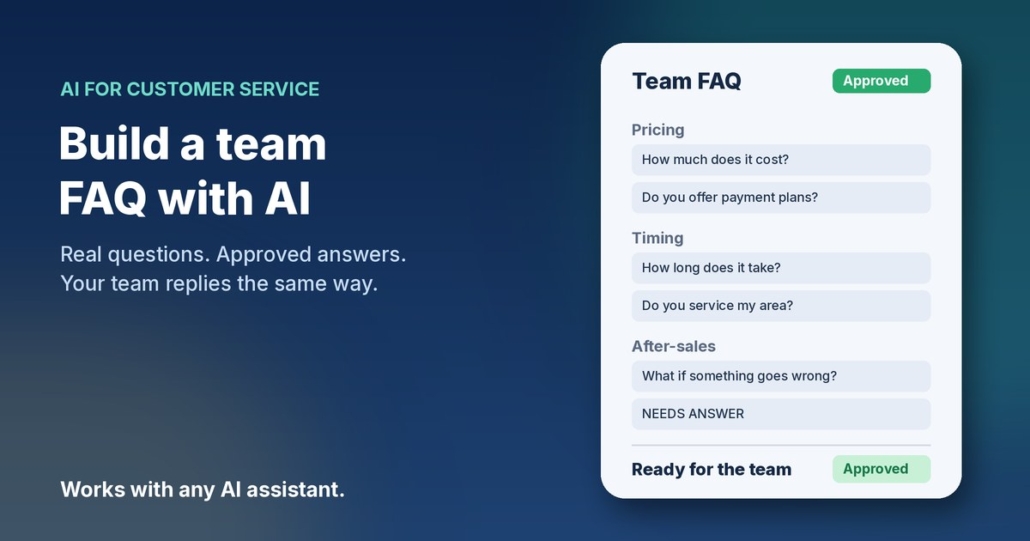
You already know the questions. “How much does it cost?” “Do you service my area?” “How long does it take?” “What happens if something goes wrong?” Your team answers them every week by email, by phone and in website chat. The trouble is, everyone answers them a little differently, and the good answers live in someone’s sent folder instead of somewhere the whole team can find them.
In this post I’ll show you how to build a team FAQ from real customer questions with AI. You collect the questions customers actually ask, let your assistant group them and draft answers, then you approve every answer before anyone uses it. It works with ChatGPT, Claude, Grokbot or any AI assistant you already use, and you can have a first version done in an afternoon.
Why most FAQs don’t help
Plenty of small businesses have an FAQ page. Very few have one that matches what customers really ask. The usual problems:
- It was written once, at launch, from guesses about what people might ask
- It answers questions nobody asks and skips the ones that land in the inbox daily
- Staff don’t use it, so they rewrite the same reply from scratch each time
- Answers drift out of date when prices, service areas or policies change
The fix is to flip the order. Start with the real questions, then write the answers. AI is very good at the boring middle part: sorting a pile of messy messages into clear groups and drafting a first answer for each. You’re good at the part that matters most, which is making sure every answer is true.
What a useful team FAQ looks like
A team FAQ isn’t just a public web page. It’s the shared set of approved answers your team pulls from when replying to customers. Each entry should have:
- The question, written the way customers actually phrase it
- A short approved answer, two to four sentences in plain English
- A longer version, if the topic needs detail or steps
- An owner, the person who checks it stays accurate
- A “last checked” date, so you know when it might be stale
Some entries can go straight onto your website. Others, like how you handle refunds case by case, stay internal. Decide that per question, not all at once.
How to build a team FAQ from real customer questions with AI
Step 1: Collect the questions customers actually ask
Pick a window, say the last 60 to 90 days, and pull questions from the places customers reach you:
- Your enquiry inbox and general email
- Website chat transcripts and contact form submissions
- Social media DMs and comments
- Notes from phone calls, if your team jots them down
- Questions that come up on sales calls (related: prep for a sales call with AI)
You don’t need the whole conversation. Copy just the customer’s question into a document, one per line. Remove names, phone numbers, addresses and anything else personal as you go. If a question appears ten times, keep a few copies, because frequency is useful information.
Step 2: Ask AI to group the questions
Open your assistant and paste the list with a prompt like this:
“Below is a list of real questions customers have asked my small Australian business, one per line, with personal details removed. Group them into themes (for example pricing, timing, service area, process, after-sales). For each theme, list the distinct questions in plain customer wording, merge near-duplicates, and show roughly how many times each came up in this list. Don’t add questions that aren’t in the list. Use Australian English.”
Read the groups. Merge anything that’s really the same question and split anything that’s two questions stuck together. This list is now your FAQ outline, ordered by what comes up most.
Step 3: Give AI the facts, then ask for draft answers
This is where most people go wrong. If you just ask AI to “answer these questions”, it will make up prices, timeframes and policies that sound plausible. Instead, give it your real facts first: your price list or ranges, service areas, standard turnaround, warranty and refund terms, and how you like to talk to customers. Then:
“Using only the business facts I’ve provided above, write a draft answer for each question in the FAQ outline. Give a short answer (2–4 sentences) and, where helpful, a longer version with steps. Plain Australian English, friendly and direct. If my facts don’t cover a question, write NEEDS ANSWER instead of guessing. Never invent prices, timeframes, guarantees, stats or customer results.”
The “NEEDS ANSWER” rule is the most important line in the prompt. Every gap it flags is a question your team has been answering inconsistently, and that’s worth knowing.
Step 4: Approve every answer
Go through the drafts one by one. For each answer, check:
- Is every fact right, including prices, areas and timeframes?
- Does it promise anything you don’t actually guarantee?
- Does it sound like your business, not a brochure?
- Is there anything that should stay internal rather than go on the website?
Fill in the NEEDS ANSWER gaps yourself, or ask the person in your team who knows. Then mark each entry approved, with an owner and today’s date. Anything not approved doesn’t get used. That’s the rule that keeps the FAQ trustworthy.
Step 5: Put it where your team will use it
An FAQ that sits in a forgotten folder is no better than none. Store the approved version somewhere your team already works: a shared doc, your help desk’s saved replies, or your CRM’s templates. Publish the customer-safe entries on your website too. If you write process documents for the team, the same approach works there (see write SOPs with AI).
A fuller prompt you can save
Once you’ve done this once, save a reusable prompt for adding new questions as they come in:
“Role: FAQ assistant for a small Australian business. Inputs: our approved FAQ, our business facts, and a list of new customer questions. Tasks: 1) Match each new question to an existing FAQ entry if one already answers it. 2) For genuinely new questions, draft a short and long answer using only our facts. 3) Flag any existing answer that seems to conflict with the facts or looks out of date. Rules: plain Australian English; never invent prices, timeframes, guarantees, stats, quotes or results; write NEEDS ANSWER where our facts don’t cover it; flag any personal information in the input so I can remove it.”
Prompts for common FAQ jobs
- Turn an FAQ into email replies: “Using this approved FAQ answer, write a short reply to this customer’s email. Keep the facts exactly as approved. Don’t add new promises.”
- Find gaps: “Compare this month’s customer questions with our FAQ. List questions we don’t cover yet, ordered by how often they came up.”
- Spot stale answers: “Here are our updated prices and policies. List every FAQ answer that no longer matches and suggest the fix.”
- Write the website version: “From the approved FAQ entries marked public, write a website FAQ section with clear headings. Keep answers short and keep every fact as approved.”
- Train a new starter: “Turn our FAQ into a 15-question quiz with answers, so a new team member can check they know our standard replies.”
What to leave out of the AI chat
Customer messages are full of personal information. Before you paste anything:
- Strip names, emails, phone numbers and addresses from every question
- Remove order numbers, account details and payment information
- Leave out health, financial or other sensitive details customers mentioned
- Only paste the question itself, not the whole thread
For Australian businesses, the Office of the Australian Information Commissioner (OAIC) has practical guidance on using AI tools with personal information: OAIC guidance on privacy and commercially available AI products. It’s worth a read before this becomes a team habit.
Keep the FAQ alive
The first version is the hard part. Keeping it useful takes about 20 minutes a month:
- Once a month, collect new customer questions from the inbox and chat
- Run them through your saved FAQ prompt to find matches and gaps
- Approve new answers and update anything flagged as out of date
- Whenever prices or policies change, update the FAQ the same day
- Ask your team which questions they still answer from scratch, and add those
Over time, the questions that keep coming up tell you something. If everyone asks the same thing before buying, that answer probably belongs on your website, your quote template or your sales page, not just in the FAQ.
Frequently asked questions
How many questions do I need to start?
Thirty to fifty real questions is plenty for a first version. You’ll usually find they boil down to ten or fifteen distinct topics. Start small and add as new questions arrive.
Which AI assistant should I use?
Any of the main ones will do: ChatGPT, Claude, Grokbot or another assistant you’re comfortable with. The real questions, your facts and your approval matter far more than the tool.
Can AI just write the FAQ without my input?
It can write something, but it will guess at your prices, policies and timeframes. That’s how a wrong answer ends up in front of a customer. Give it your facts, and approve every answer before it’s used.
Should the team FAQ and the website FAQ be the same?
Mostly, but not completely. Keep one approved source and mark each entry public or internal. Things like case-by-case refund handling or escalation steps usually stay internal.
How do I stop answers going out of date?
Give each entry an owner and a “last checked” date, and update the FAQ whenever prices or policies change. A quick monthly review catches the rest.
Can I use the FAQ to power a website chatbot?
Yes, an approved FAQ is a good starting point for a website chat assistant, because it gives the bot real answers to work from. Keep a person in the loop for anything the FAQ doesn’t cover.
Want help turning your inbox into answers?
If you’d like help working out which customer questions are worth answering once and reusing, and which other admin AI can take off your plate, book an AI audit and we’ll go through it together. Or, if you’d rather start yourself, grab the AI agents pack. It works with ChatGPT, Claude, Grokbot or any AI assistant, and you can have your first agent running this week.