It’s Friday afternoon. You’ve been flat out all week, the phone hasn’t stopped, and if someone asked you how the business actually went this week, you’d probably say “busy”. But busy doing what? How many enquiries came in? How many turned into jobs? Which quotes are still sitting there with no reply? And what’s the one thing that would make next week better?
Most small business owners never stop long enough to answer those questions. Not because they don’t care, but because there’s no time, and pulling it all together feels like a job in itself.
In this post I’ll show you how to set up a simple weekly business review with AI: you spend ten minutes on a Friday pasting in your numbers and notes, and your AI assistant turns them into a one-page report with next week’s top three priorities. Then on Monday it turns that report into a plan. It works with ChatGPT, Claude, Grokbot or any AI assistant, and you don’t need to connect anything to get started.
Why owners never get time to work on the business
When I talk to small business owners about where AI can help, a weekly review rarely comes up first. Lead replies and follow-ups get the attention because the pain is obvious. But underneath a lot of those problems is the same thing: nobody’s stepping back to look at the whole week.
Here’s what that usually looks like:
- You run on gut feel. You know roughly how things are going, but you couldn’t tell me whether this week was better or worse than last week.
- Things slip quietly. A quote doesn’t get followed up, a to-do gets carried over three weeks in a row, and nobody notices until it’s a problem.
- Reviews feel like homework. Sitting down with a blank page and a spreadsheet at the end of a long week is the last thing anyone wants to do.
That last one is where AI genuinely helps. You still provide the facts. The AI does the boring part: organising them, spotting what’s stuck, and writing it up in a format you can read in two minutes.
What an AI weekly business review actually does
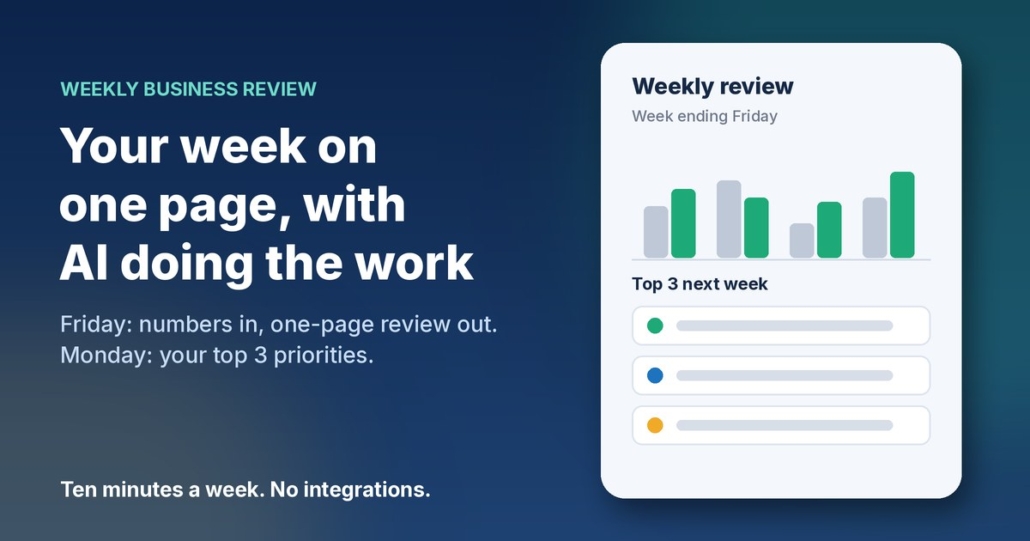
The Weekly Business Review agent in my free AI agents pack is one of the simplest in the pack, and it needs no integrations at all. Each week it:
- Takes what you paste in on Friday: your handful of weekly numbers, the enquiries that came in, your to-do list, and anything else that happened.
- Writes a one-page review with the same headings every week, so you can compare one week with the next.
- Calls out what’s stuck, such as leads that haven’t been followed up or to-dos that keep getting carried over.
- Picks next week’s top three priorities, each with a small first step.
- Turns it into a plan on Monday, with no more than three must-dos per day.
The one-page review format
Here are the headings I use:
- The week in one line
- Numbers: this week vs last week (and against your targets, if you have them)
- What went well (no more than three points)
- What’s stuck or slipping (no more than three points)
- Next week’s top three priorities, each with a first step
- One thing to stop doing or hand off
That’s it. If it doesn’t fit on one page, it’s too long, and you won’t read it.
The most important rule: no made-up numbers
AI assistants are very good at sounding confident, and that’s a risk when you’re dealing with figures. If you forget to give it last week’s invoicing total, a badly briefed assistant might fill the gap with a guess. So the brief needs one firm rule: only use the numbers I give you, never estimate, and if something’s missing, write “not provided”. A review built on invented numbers is worse than no review at all.
How to set it up in about 30 minutes
Step 1: Pick three to six weekly numbers
Don’t try to track everything. Choose a few numbers that tell you whether the week went well, and that you can find in a couple of minutes. For a service business that might be new enquiries, quotes sent, jobs booked and money invoiced. A clinic might track appointments booked, cancellations and new clients. If you’re not sure, ask your AI assistant to interview you about how you win customers and get paid, one question at a time, and recommend the numbers and where you’d find each one.
Step 2: Start a simple weekly numbers note
Keep one line per week in a note or spreadsheet, copied from wherever the figures live: your invoicing software, booking system or inbox. This becomes your “last week” comparison, and after a couple of months you’ll have a picture of your business you’ve probably never had before.
Step 3: Give your AI assistant a clear brief
Set up a project, custom assistant or saved note in ChatGPT, Claude, Grokbot or any AI assistant, and paste in a brief like this, filled in with your details:
You are the weekly business reviewer for [business name], a [type of business] in [area]. Each Friday I’ll paste in this week’s numbers ([your numbers]), enquiries, to-do list and anything else that happened. Turn it into a one-page Weekly Business Review with these headings: 1. The week in one line. 2. Numbers: this week vs last week. Only use numbers I give you. Never invent or estimate. If something’s missing, write “not provided”. 3. What went well (max 3 points). 4. What’s stuck or slipping (max 3 points), including leads not followed up and to-dos carried over more than once. 5. Next week’s top 3 priorities, each with a small first step. 6. One thing to stop doing or hand off. Plain Australian English, direct and encouraging, no waffle. It must fit on one page.
If your assistant doesn’t remember past chats, paste last week’s report in too, so it can compare.
Step 4: Friday, run the review
Set a reminder for Friday afternoon. When it goes off, paste in the week: your numbers, a quick list of enquiries (name, what they wanted, where it’s at), your to-do list marked done or not done, and any wins or problems. Read the review, fix anything that’s off, and save it in a “Weekly reviews” folder.
Step 5: Monday, set the plan
On Monday morning, paste Friday’s report plus anything new since then, and ask for your plan for the week: the top three priorities with a first step and a time for each, no more than three must-dos per day, and anything to delegate, delay or drop. Then block out time in your calendar for the top three before the week takes over.
What to feed it each Friday
The review is only as good as what you give it. You don’t need to be thorough, just honest. A Friday paste-in might look something like this (example figures only):
Numbers: Enquiries 9, quotes sent 5, jobs booked 3, invoiced $6,400.
Enquiries: Sam, bathroom quote, waiting on reply. Jo, ongoing maintenance, booked. Alex, price check, no reply yet.
To-dos: Update price list (not done, third week). Chase two overdue invoices (done).
Anything else: Lost a day to a supplier delay. Two great Google reviews.
From that, a good review will tell you that the price list has now slipped three weeks and should either get done or get dropped, that Alex hasn’t heard back, and that Sam’s quote needs a follow-up before the weekend.
Keep an eye on cash flow and privacy
If money in and money out isn’t one of your weekly numbers, I’d think about adding it. business.gov.au’s cash flow section has a free cash flow statement template and a guide to managing cash flow, and a weekly review is a natural place to check it. The AI won’t do your bookkeeping, but it will notice when overdue invoices keep showing up in your notes.
Be sensible about what you paste in, too. The Office of the Australian Information Commissioner’s guidance on privacy and the use of commercially available AI products recommends caution about putting personal information, especially sensitive information, into publicly available AI tools. For a weekly review you rarely need it: first names and a few words about the job are plenty. Use a business account of your AI assistant and check its data settings. This isn’t legal advice, so if you handle health or other sensitive information, check what applies to you.
What a weekly review gets you
The obvious win is clarity. In ten minutes on a Friday you know how the week went, what’s slipping and what matters next. The less obvious win is consistency: the same six headings every week make patterns easy to spot, like a number that’s drifting down, or the same task that never gets done.
Frequently asked questions
Do I need to connect my accounting or booking software?
No. This agent works fine with copy and paste. You copy a few numbers from wherever they live into your weekly note, then paste the week into your AI assistant. If your assistant can connect to your other tools you can automate more later, but it isn’t needed.
How long does the weekly review take?
Once it’s set up, around ten minutes on a Friday to gather and paste in your notes, and a few minutes on Monday to set the plan. The first setup takes about half an hour.
What if I don’t know which numbers to track?
Ask your AI assistant to interview you about how you win customers and get paid, then recommend three to six numbers and where to find each one. Start small. You can always change them later.
Can the AI get my numbers wrong?
It can if you let it guess. Tell it to only use the numbers you give it, never estimate, and write “not provided” for anything missing. Always check the numbers section before you rely on the review.
Which AI tool should I use?
Whichever one you already use. The brief above works in ChatGPT, Claude, Grokbot or any AI assistant. A consistent format and honest notes matter far more than the brand of tool.
Get my AI agents (free)
My free Steal My AI Agents pack includes the Weekly Business Review agent, plus agents for instant lead replies, follow-ups, reviews, client onboarding and inbox triage, with the prompts, setup steps and routines. It works with ChatGPT, Claude, Grokbot or any AI assistant. No code needed.
Rather have it set up for you? Book a free AI audit.