
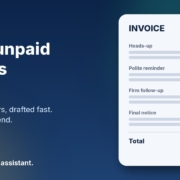
Most small business owners I talk to are great at doing the work and not so great at chasing the money for it. The job is finished, the invoice has gone out, and then it just sits there. You mean to send a reminder, but it feels awkward, you’re busy with the next job, and before you know it the invoice is weeks overdue and your cash flow is feeling it.
Chasing unpaid invoices is one of those jobs that’s perfect for AI. It’s repetitive, it’s mostly writing, and the hard part is getting the tone right, firm without being rude. In this post I’ll show you how to chase unpaid invoices with AI, step by step, using ChatGPT, Claude, Grokbot or any AI assistant you already have. You stay in charge of who gets chased and when. The AI just takes the awkward writing off your plate.
Why invoices slip through the cracks
When I look at how a business handles overdue invoices, the problem is rarely that the owner doesn’t care. It’s usually one of these:
- Nobody owns it. Following up on payments is “everyone’s job”, which means it’s nobody’s job.
- It feels awkward. You’ve got a good relationship with the customer and you don’t want to sound pushy.
- Every reminder starts from a blank page. So it gets put off until there’s time to write it properly.
- There’s no clear sequence. One customer gets three reminders, another gets none, depending on how busy the week was.
Every one of those is fixable with a simple system and a bit of help from AI.
What AI should and shouldn’t do when chasing payments
Money conversations need care, so it’s worth being clear about the line before you start.
Let AI handle
- Drafting friendly reminders, firmer follow-ups and final notices in your voice
- Adjusting the tone for a long-term customer versus a one-off job
- Summarising your overdue list into “who to chase today”
- Writing a short phone script for when an email isn’t enough
Keep with you
- Checking the amounts, dates and invoice numbers against your accounting software
- Deciding when to offer a payment plan, pause work or escalate
- Anything that involves legal action or a debt collector
- The final read-through before anything is sent
The AI drafts. You check and send. Nothing goes to a customer without you seeing it first.
Step 1: Get your payment terms clear
Reminders work best when your terms were clear from the start. If your invoices don’t already show the due date, how to pay and what happens when payment is late, fix that first. The Australian Government’s business.gov.au payments and invoicing guide is a good plain-English place to check what to include on an invoice and how to set your terms.
You can ask your AI assistant to help tidy the wording too. Paste in your current terms and ask: “Rewrite these payment terms so they’re short, clear and friendly for a small business customer. Don’t change any amounts, dates or conditions.”
Step 2: Write your reminder brief once
The secret to getting good results from AI is giving it a clear brief. Write this once, save it somewhere handy, and reuse it every time. Here’s a starting point you can copy and adjust:
You help me write payment reminders for my business, [business name]. We [what you do]. My tone is friendly, direct and professional. Australian English. Keep emails short, under 120 words. Always include the invoice number, amount, original due date and how to pay, exactly as I give them to you. Never change or invent any numbers. Never threaten legal action unless I specifically ask. End with a simple next step for the customer.
That last line matters. A reminder that says “please pay” gets ignored. A reminder that says “you can pay by bank transfer to the details below, or reply if there’s a problem with the invoice” gets a response.
Step 3: Build a simple reminder sequence
Instead of deciding what to do with each invoice from scratch, set up a sequence and ask your AI to draft each stage. A simple one I suggest to clients looks like this:
A few days before the due date: the friendly heads-up
Not a chase at all, just a helpful nudge. “Just a quick reminder that invoice 1042 is due on Friday.” Plenty of late payments are simply forgotten, and this catches them early.
Just after the due date: the polite reminder
Assume it’s an oversight. Restate the details, make paying easy, and invite them to reply if something’s wrong with the invoice.
A couple of weeks overdue: the firmer follow-up
Still polite, but clearer. Mention the earlier reminder, ask for a payment date, and offer to talk if they’re having trouble.
Well overdue: the phone call and final notice
At this point, pick up the phone. Ask your AI for a short call script so you know what you’ll say, then follow up with a final written notice that sets out the next step. If it gets to this stage, it’s worth reading the guidance from the Australian Small Business and Family Enterprise Ombudsman on dealing with late payment and disputes before you decide what to do next.
Your timings will depend on your industry and your terms, so set them to suit you. What matters is that every customer gets the same fair treatment, and nothing relies on you remembering.
Step 4: Draft each reminder in under a minute
Once your brief and sequence are set, chasing an invoice looks like this:
- Open your AI assistant and paste in your saved brief.
- Add the details: customer name, invoice number, amount, due date, which stage of the sequence they’re at, and anything relevant (“long-term client, always pays eventually” or “first job with us”).
- Ask for the draft.
- Check every number against your accounting software, tweak anything that doesn’t sound like you, and send it.
For example: “Stage 2 reminder. Customer: Sarah at Coastal Cafe. Invoice 1042, $1,850, due 28 October. Regular customer, very friendly. Pay by bank transfer, details on the invoice.”
You’ll get a short, warm reminder that’s ready to go after a quick check. What used to take fifteen minutes of putting it off now takes one.
Step 5: Make it a weekly habit
The businesses that get paid on time aren’t the ones with the fanciest software. They’re the ones that check their overdue list every week, without fail. Pick a time, say Monday morning, and spend ten minutes on it.
Export or copy your overdue invoice list from your accounting software, paste it into your AI assistant and ask: “Sort this list by how overdue each invoice is, and tell me which stage of my reminder sequence each customer is at.” Then work through the drafts one by one.
Before you paste anything in, think about privacy. Only share what’s needed to draft the message, and check your AI tool’s settings around how your data is stored and used. If you’re working with customer details, the OAIC’s guidance on using commercially available AI products is worth a read.
If you want to look at the bigger picture, I’ve written about running a weekly business review with AI, and your overdue invoices fit neatly into that routine. The Australian Government also has practical tips on managing cash flow.
Tips for getting the tone right
- Assume good intent at first. Most late payers aren’t dodging you. They’ve forgotten, or the invoice went to the wrong person.
- Make paying easy. Every reminder should include exactly how to pay. The fewer steps, the faster the money arrives.
- Be specific. “Could you let me know when this will be paid?” gets a better response than “Please pay ASAP.”
- Keep it short. Long, emotional emails get skimmed. Ask the AI to keep it brief.
- Stay calm on paper. If you’re frustrated, let the AI write the first draft. It won’t be annoyed, and you can add firmness where it’s needed.
Turning it into an AI agent
Once you’ve used this for a few weeks, you’ll notice it’s the same steps every time. That’s the point where it makes sense to turn it into a simple AI agent: a saved set of instructions that knows your terms, your sequence and your tone, so you just hand it the overdue list and it gives you every draft at once.
That’s exactly what our AI agents pack is built for. It gives you ready-made agents for everyday small business jobs like this, and it works with ChatGPT, Claude, Grokbot or any AI assistant. No new software to learn, and you still approve everything before it goes out.
Frequently asked questions
Is it okay to use AI to write payment reminders?
Yes, as long as you check every message before it’s sent. The AI drafts the wording. You confirm the amounts, dates and tone, and you decide when to send.
Will the reminders sound like a robot wrote them?
Not if you give it a good brief. Tell it your tone, give it a couple of examples of emails you’ve written, and edit the first few drafts. It quickly starts to sound like you.
Can AI send the reminders automatically?
It can be set up to, but I recommend starting with drafts you review and send yourself. Money conversations are personal, and you’ll want to keep a human eye on them, especially at the firmer stages.
What should I do if a customer still won’t pay?
Call them, then send a clear final notice. If that doesn’t work, get proper advice before taking further steps. The Australian Small Business and Family Enterprise Ombudsman is a good place to start.
Do I need special software for this?
No. Your existing accounting software and any AI assistant are enough to get started today.
Want help getting paid faster?
If you’d like to see where AI could save you the most time, from chasing invoices to quotes to admin, book an AI audit and we’ll map it out together. Or, if you’d rather get started yourself, grab the AI agents pack and have your first agent running this week.