
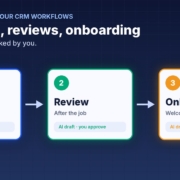
A lot of small businesses I talk to are paying for GoHighLevel every month and using a fraction of it. The pipeline is there, the calendars are there, the workflow builder is there. But the follow-up sequences never got written, the review requests go out when someone remembers, and new clients still get a welcome email typed from scratch.
That’s not a software problem. It’s a writing and setup problem, and that’s exactly where AI helps. In this post I’ll walk you through why GHL accounts stay half set up, then three jobs you can hand to AI first: follow-up sequences, review requests after the job, and a client onboarding checklist. Then I’ll show you how to test it all before you switch anything on.
Quick note: I’m independent and not affiliated with or endorsed by HighLevel. GoHighLevel and HighLevel are trademarks of their owner.
Why GoHighLevel accounts stay half set up
GoHighLevel can do a lot. That’s the selling point, and it’s also the problem. When a tool can do everything, someone has to decide what it should do for your business, write the words, build the steps and keep them up to date. In most small businesses, that someone is the owner, and the owner is busy running the business.
Here’s what I usually see when I open up an account:
- Empty or default workflows. The account was set up by an agency or a course template, and nobody has touched the workflows since.
- Generic messages. The follow-up texts that do exist were written for “any business”, so they don’t sound like you and customers can tell.
- Stages nobody uses. The pipeline has stages, but jobs don’t get moved, so any automation tied to those stages never fires.
- Fear of breaking something. Owners worry that if they switch a workflow on, it’ll spam their customer list. So they leave it off.
The good news: the hardest part of all of this is the writing and the thinking, and AI is very good at both. You can get the words and the logic drafted in an afternoon, then put them into GHL piece by piece.
HighLevel has its own AI too
It’s worth knowing what’s already built in. HighLevel’s support portal describes a Workflow AI Builder that turns a plain-language prompt into a workflow you then review and refine, and Conversation AI bots that can collect lead details, answer common questions and help with booking. HighLevel’s own guide says generated workflows need a manual review before you publish them, which is good advice for any AI setup. Features and pricing depend on your plan, so check your account before you rely on them.
Whether you use HighLevel’s built-in AI or an outside assistant like ChatGPT, Claude or Grokbot, the same rule applies: you still need to know what you want it to say and when. That’s what the rest of this post is about.
Job 1: AI-written follow-up sequences
Most quotes and enquiries that go cold weren’t lost. Nobody followed up. A follow-up sequence in GHL fixes that, but only if the messages are good enough that you’re happy for them to go out.
Decide the cadence first
Keep it simple. A day 1, day 3 and day 7 rhythm works for a lot of service businesses: a quick check-in, a helpful nudge, then a polite last message that makes it easy to say no. Write down when the sequence should stop, for example as soon as the person replies, books, or says they’ve gone elsewhere.
Get AI to draft the messages in your voice
Give your AI assistant three or four real messages you’ve sent before, a short description of your business and your service area, and the cadence. Ask it to write each message for SMS and email, short and friendly, with one clear next step. Then edit them until they sound like you. I cover the tone side in more detail in my post on how to follow up leads with AI without being pushy.
Personalise with the fields you already have
GHL lets you insert contact fields into messages. Ask the AI to use the ones you actually fill in, such as first name, service type and suburb. A follow-up that mentions “the bathroom quote in Ashgrove” lands very differently to “your recent enquiry”. (That’s an example, not a real customer.)
Job 2: Review requests after the job
Happy customers rarely leave a review unless you ask, and asking feels awkward. A simple automated request, sent at the right moment, takes the awkwardness out of it.
Trigger it on the win
Tie the request to a clear moment, such as a job being marked complete or an invoice being paid. If your pipeline stages aren’t kept up to date, fix that first, or the request will go out at the wrong time or not at all.
Write a short, personal ask
Ask the AI for a two or three line message that thanks the customer for something specific, then gives them the link. No pressure, no incentives, no long story. Ask for a second version for the reminder a few days later, and stop after that.
Ask everyone, not just the happy ones
Don’t set up a workflow that only sends the review link to people who rate you highly and sends everyone else somewhere else. That’s called review gating and it goes against Google’s review policies. Ask every customer, and handle any complaints that come back as a person, not a bot. My post on getting more Google reviews with AI goes through this step by step.
Job 3: A client onboarding checklist
When a deal is won, the next few days set the tone for the whole relationship. If onboarding happens in your head, things get missed: the access you needed, the forms they never filled in, the kick-off call nobody booked.
Write the checklist once
Tell your AI assistant what happens after someone says yes in your business, even in rough dot points. Ask it to turn that into a clean checklist with three parts: what the client needs to send you, what your team needs to do, and when each step should happen. You only have to do this once.
Turn it into messages and tasks
From that checklist, get the AI to draft the welcome email, a short reminder for anything the client hasn’t sent yet, and the internal tasks for your team. In GHL, these can hang off the “won” stage: the welcome goes out, tasks are created and assigned, and a reminder follows if a form is still missing. For more on this, see how to onboard new clients with AI.
Test everything before you switch it on
This is the step most people skip, and it’s the one that stops the “what if it spams everyone” fear from coming true.
Use a test contact
Create a contact with your own mobile and email, and run them through every workflow. Read every message as if you were the customer. Check the timing, the personalisation fields and the links.
Check the stop rules
Reply to a follow-up as your test contact and make sure the sequence stops. Move the test deal to won and check the follow-up ends and onboarding starts. These are the bits that cause the most embarrassment when they’re wrong.
Start small
Switch on one workflow for new contacts only, not your whole list. Watch it for a week. Look at what went out, what people replied and anything that looked off, then fix the wording or the logic before you add the next one.
Keep a person in the loop for the tricky stuff
Decide what must always go to a human: pricing questions, complaints, anything legal or sensitive. If you’re unsure about the data side, my post on whether AI is safe for small business covers what to check.
What to do this week
- Pick one job. Follow-up, reviews or onboarding. Choose the one that costs you the most work today.
- Write your rules in plain English. Your services, area, tone, cadence and what always goes to a person.
- Get AI to draft the messages. Use your own past messages as examples, then edit until they sound like you.
- Build it in GHL and test it on yourself. One workflow, one test contact, every message read end to end.
- Switch it on for new contacts only. Review after a week, then add the next job.
If you’d rather start with the instructions already written, the free CRM agent pack for GoHighLevel gives you AI agents for lead replies, follow-ups and pipeline updates. They’re plain-English instructions that work with ChatGPT, Claude, Grokbot or any AI assistant, so there’s nothing to install.
FAQ
Do I need to know how to build workflows to use AI with GoHighLevel?
No. AI can draft the messages and describe the steps in plain English, and HighLevel’s own Workflow AI Builder can turn a prompt into a workflow. You still need to review every step and test it before you switch it on.
Will AI send messages to my customers without me checking?
Only if you set it up that way. Start by testing every workflow on your own contact, switch it on for new contacts only, and keep pricing, complaints and anything sensitive with a person.
Can I only send review requests to happy customers?
No. Filtering out unhappy customers before asking for a review is called review gating and goes against Google’s review policies. Ask every customer and handle complaints personally.
Should I use HighLevel’s built-in AI or ChatGPT, Claude or Grokbot?
Either can work. Many businesses draft messages and checklists in their usual AI assistant, then build them in GHL. Check what your HighLevel plan includes before relying on its built-in AI features.
What’s the best first job to automate in GoHighLevel?
Whichever one loses you the most work today. For many service businesses that’s quote follow-up, because the leads are already in the pipeline and just need a nudge.
Make GoHighLevel finally run itself
Grab the free CRM agent pack: AI agents for lead replies, follow-ups and pipeline updates, with no weekend workflow building. Prefer a hand? Book a free 15-minute AI workflow audit and we’ll find your first quick win.
Get the free CRM agent pack or book a free AI audit
Independent AI agents. Not affiliated with or endorsed by HighLevel.