After almost every meeting I sit in with small business owners, the same thing happens. Someone closes the laptop, everyone nods, and the notes sit in a phone, a scrap of paper or a half-finished Google Doc. Decisions were made. Jobs were handed out. Deadlines were mentioned. A week later, half of it has slipped. Not because anyone is lazy — because the notes never turned into a clear action list.
In this post I’ll show you a simple way to turn meeting notes into actions with AI. You dump the rough notes or transcript in, the AI pulls out decisions, owners, deadlines and open questions, you check the list, and you send a short action summary. It works with ChatGPT, Claude, Grokbot or any AI assistant you already use. You stay in charge of what goes out.
Why meeting notes die on the vine
Most small businesses don’t have a dedicated note-taker. The person running the meeting is also trying to think, talk and write. So the notes end up as:
- Bullet points with no owners (“follow up quote”)
- Half-sentences only the writer understands
- A long transcript nobody will re-read
- Nothing at all — “we’ll remember”
When the next meeting rolls around, people spend the first ten minutes reconstructing what was agreed last time. That’s wasted time you can get back with a short, repeatable habit.
What “good” looks like after a meeting
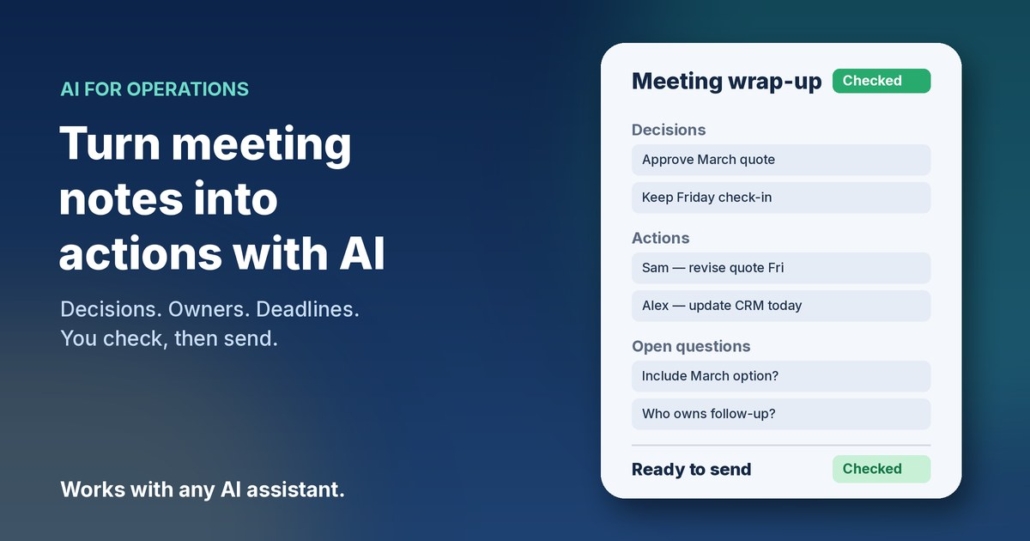
A useful meeting wrap-up is one page or less. It has four parts:
- Decisions — what we agreed, in plain English
- Actions — who does what, by when
- Open questions — things we still need to answer
- Parking lot — ideas raised that aren’t for this week
If your wrap-up has those four, anyone who missed the meeting can catch up in two minutes. That’s the bar. AI is good at building this shape from messy input. You are good at checking that the names, dates and wording match what actually happened.
How to turn meeting notes into actions with AI
Step 1: Capture something — anything
You don’t need a perfect transcript. Pick one capture method and stick to it:
- Handwritten or typed bullets during the meeting
- Voice notes you dictate into your phone right after
- A meeting transcript from your video call tool (if you already have one)
- A rough email you send yourself with “stuff we said”
The messier the capture, the more useful the AI step. Don’t polish first. Get it out of your head while it’s still fresh — ideally within an hour of the meeting ending.
Step 2: Paste it into your AI assistant with a clear ask
Open ChatGPT, Claude, Grokbot or whichever assistant you use, and paste your notes with a prompt like this:
“You’re helping me turn rough meeting notes into a clear action list for my small business. Below are my messy notes / transcript from a meeting about [topic]. Extract and organise into four sections: 1) Decisions (what we agreed), 2) Actions (owner, task, deadline — if a deadline wasn’t said, mark Deadline: not set), 3) Open questions, 4) Parking lot. Use plain Australian English. Don’t invent owners, dates or decisions I didn’t mention. If something is unclear, put it under Open questions instead of guessing. End with a short ‘send-ready’ summary I can paste into email or chat.”
That last instruction matters. You want something you can send, not a long report.
Step 3: Check every line before anyone else sees it
AI is fast at sorting. It is also happy to invent a tidy story when your notes are vague. Read the draft and check:
- Are the owners right? (Not “the team” — a real name)
- Are the deadlines real, or did the AI fill one in?
- Did it turn a maybe into a decision?
- Is anything confidential that shouldn’t leave this chat?
Fix those, then ask: “Update the list with my corrections and keep the same four sections.”
Step 4: Send a short action list the same day
Copy the send-ready summary into email, Slack, Teams or your project tool. Keep it short. Something like:
“Quick wrap from today’s meeting. Decisions: … Actions: Sam — send revised quote by Friday; Alex — update CRM notes today. Open: do we want to include the March option? Ping me if I’ve got an owner or date wrong.”
Sending it the same day is the whole game. A perfect list next week is less useful than a good-enough list today.
Step 5: Drop actions into wherever you already track work
If you use a CRM, a shared task board or a simple spreadsheet, move each action there with the owner and date. If you don’t have a tracker yet, the action email itself is fine for a while. The point is that actions leave the notes and land somewhere people look. Related reading: keep your CRM up to date with AI and run a weekly business review with AI.
A fuller prompt you can save
Once you’ve done this a few times, save a reusable prompt so you’re not rewriting it every meeting:
“Role: meeting wrap-up assistant for a small Australian business. Input: rough notes or transcript. Output only: Decisions | Actions (Owner — Task — Deadline) | Open questions | Parking lot | Send-ready summary (under 150 words). Rules: plain Australian English; never invent owners, deadlines or decisions; mark missing deadlines as ‘not set’; flag anything that sounds like personal or sensitive data so I can remove it before sharing. Ask me up to three clarifying questions only if a decision or owner is genuinely ambiguous.”
Paste that once at the top of a chat, then drop each meeting’s notes underneath. Same structure every time means people know what to expect.
Prompts for common meeting types
- Sales / discovery call: “From these notes, list: prospect pain points, what we promised to send, next step with owner and date, and anything we still need to confirm before quoting.”
- Internal ops meeting: “Turn these notes into actions only. Drop discussion. One line per action: Owner — Task — Deadline. Flag anything with no owner.”
- Client project check-in: “Extract decisions that change scope, budget or timeline. List client asks separately from our internal actions.”
- Hiring / interview debrief: “Summarise strengths, concerns and agreed next step. Do not invent ratings. Keep candidate personal details out of the send-ready summary.”
- Board or advisor catch-up: “List decisions and open questions only. Keep the send-ready summary under 100 words.”
What to leave out of the AI chat
Meeting notes often include things that shouldn’t go into a general AI tool. Before you paste:
- Strip passwords, one-time codes and private account details
- Remove or blur personal information you don’t need for the action list (home addresses, health notes, payroll figures)
- Don’t paste full contracts or bank details just to extract “send the invoice”
For Australian businesses, the Office of the Australian Information Commissioner (OAIC) publishes practical guidance on using commercially available AI products with personal information — worth a read before you make this a team habit: OAIC guidance on privacy and commercially available AI products. When in doubt, keep the AI input to decisions and tasks, and leave sensitive detail in your own systems.
Make it a habit, not a one-off
The workflow only pays off if you do it every time. A simple rule that works for most owners:
- End every meeting with two minutes of capture (bullets or a voice note)
- Run the AI wrap-up before you open the next app
- Send the action list before you leave the desk (or the car park)
- Once a week, skim last week’s actions in your weekly review and chase what’s still open
If the same kind of meeting keeps producing the same open questions, that’s a process gap — the kind you can turn into a short SOP later. See how to write SOPs with AI.
Frequently asked questions
Do I need a fancy meeting transcription tool?
No. Rough bullets or a voice note after the meeting are enough. A transcript helps if you already have one, but it’s not required. The AI step works on messy input.
Which AI assistant should I use?
Any of the main ones will do — ChatGPT, Claude, Grokbot or another assistant you’re already comfortable with. The prompt and your check matter more than the brand.
What if nobody was assigned an owner in the meeting?
Don’t let the AI invent one. Put those items under Open questions or mark Owner: not set, then decide before you send. A list with honest gaps is better than a tidy list with the wrong names.
How long should the send-ready summary be?
Under about 150 words. If people need the full detail, they can ask. The wrap-up’s job is to make the next steps obvious.
Is it okay to paste client names into the AI tool?
Be careful. For many tools, treat anything you paste as data you wouldn’t mind a third party processing. Use initials or project codes when you can, strip personal details, and follow the OAIC guidance linked above. When the notes are sensitive, keep the AI step on your own device or a tool your business has reviewed.
Can my team use the same prompt?
Yes — and they should. Save the fuller prompt in a shared doc so every wrap-up looks the same. Consistency makes it easier to scan and harder for actions to hide.
Want this running as a repeatable habit?
If you’d like help mapping which meetings are worth wrapping this way, and which other admin AI can take off your plate, book an AI audit and we’ll walk through it together. Or, if you’d rather start yourself, grab the AI agents pack. It works with ChatGPT, Claude, Grokbot or any AI assistant, and you can have your first agent running this week.