
Every year it’s the same story. The Christmas break is a couple of weeks away, everyone’s flat out trying to finish jobs, and the handover gets squeezed into the last afternoon before you lock up. Then on 2 January someone’s ringing you at the beach because nobody knows where the supplier quote is, which customer was promised a callback, or what the password is for the booking system.
In this post I’ll show you how to hand over work before holidays with AI. You do a quick brain dump, let your assistant turn it into a clear handover with a coverage checklist and a who-owns-what list, then you check it and send it. It works with ChatGPT, Claude, Grokbot or any AI assistant you already use, and it takes an hour or two instead of a frantic afternoon.
Why holiday handovers go wrong
Most small business handovers don’t fail because people don’t care. They fail because the important stuff lives in your head, and writing it down feels like a job for later. The common problems:
- The handover is written at the last minute, so it’s rushed and patchy
- It lists tasks but not the context: who the customer is, what was promised, what “done” looks like
- Nobody is clearly named as owner, so two people do the same thing or nobody does it
- It doesn’t say what to do when something goes wrong, so the default is “call the boss”
- Logins and access are left out, or worse, pasted into an email
AI won’t magically know what’s going on in your business. What it’s very good at is taking a messy dump of everything you’ve said and turning it into a tidy, consistent document that someone else can actually follow. You supply the facts. It supplies the structure.
What a good holiday handover includes
Before you open your AI assistant, it helps to know what you’re aiming for. A useful handover has five parts:
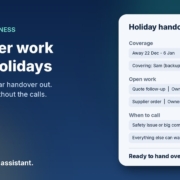
- Dates and coverage: who’s away when, who’s covering, and when the business is closed, open or on reduced hours
- Open work: every job, quote or customer conversation that’s still live, with where it’s up to and the next step
- Who owns what: one named person for each item, plus a backup
- What can wait: things that don’t need touching until you’re back, so nobody wastes time on them
- When to call: the short list of situations that are genuinely worth interrupting your holiday for, and how to reach you
If your handover covers those five things clearly, the person covering can make good decisions without guessing.
How to hand over work before holidays with AI
Step 1: Do a brain dump, not a document
Don’t try to write the handover yourself. Instead, spend fifteen or twenty minutes getting everything out of your head in whatever form is fastest. You can type rough notes, use voice dictation on your phone while you drive, or talk through your week out loud and paste in the transcript.
Go through the places work hides:
- Your inbox, especially anything flagged or waiting on a reply
- Your calendar for the weeks you’re away and the first week back
- Open quotes, jobs and invoices in your job management or accounting software
- Promises you’ve made on the phone (“I’ll get back to you after Christmas”)
- Recurring tasks: payroll, BAS reminders, supplier orders, social posts, backups
Don’t worry about order or spelling. Messy is fine. The goal is to get it all out so nothing lives only in your head.
Step 2: Ask AI to turn it into a structured handover
Paste your brain dump into your AI assistant with a clear prompt. Something like this:
I’m going on holiday from [date] to [date]. [Name] is covering for me. Below are my rough notes about open work. Turn them into a handover document with these sections: dates and coverage, open work (one item per row with customer or project, where it’s up to, next step, due date and owner), recurring tasks during the break, things that can wait until I’m back, and when to call me. Use plain Australian English. Don’t add anything that isn’t in my notes. If something is unclear or missing, list it as a question at the end instead of guessing.
That last instruction matters. You want the AI to flag gaps, not fill them with confident guesses. A handover with a made-up due date is worse than one with a question mark.
Step 3: Build the coverage checklist
Next, ask for a simple coverage checklist for the whole break. For example:
Using the handover above, create a day-by-day coverage checklist for the break. For each working day, list who’s on, what needs checking (inbox, phones, website enquiries, bookings) and any task due that day. Mark the public holidays and days we’re closed.
You’ll get a one-page view of the break that anyone can follow. Check the dates against your own calendar and your state’s public holidays, because AI can get those wrong. It’s your job to confirm them, not the assistant’s.
Step 4: Make the who-owns-what list
Ownership is where handovers usually fall apart, so give it its own list. Ask the AI to pull every item from the handover into a short table: the task, the owner, the backup, and how the owner will know it’s done. If there’s only one person covering, that’s fine. The table still makes it obvious when one person has been handed too much.
Look down the list and ask yourself one honest question: if this person is sick on day two, does anyone else know what to do? If the answer is no, add a backup or move the task to “can wait”.
Step 5: Write the “when to call me” rules
This is the bit that protects your holiday. Ask the AI to help you draft a short list of situations worth interrupting you for, and a longer list of situations the person covering can handle on their own. You might decide:
- Call me: a safety issue, a major customer complaint, anything involving a large payment or contract
- Message me, no rush: a new enquiry that looks big, a supplier problem that can wait a day
- Handle it yourself: routine questions, rebooking, small refunds within an agreed limit
Those categories are only examples. You set the rules and the limits. The AI just helps you write them clearly so there’s no grey area.
Step 6: Draft the customer and supplier messages
While you’ve got the context loaded, get the AI to draft the messages you’ll need: your out-of-office reply, a holiday hours note for your website and Google Business Profile, a short email to key customers with open jobs, and a reminder to suppliers about your closure dates. Read each one before it goes anywhere. You’re sending these under your name, so they need to sound like you and be accurate.
Step 7: Check it, then walk the person through it
AI gets you a strong first draft, but it doesn’t know what it doesn’t know. Read the whole handover with the person covering, ideally a few days before you leave rather than on the last afternoon. Go through the questions the AI flagged, fix anything wrong and let them ask their own questions. Twenty minutes of walking through it together beats a perfect document nobody has read.
A note on passwords and private information
Don’t paste passwords, banking details or sensitive customer information into an AI chat, and don’t put them in the handover document either. Instead, note in the handover where access lives, for example “booking system login is in the shared password manager”, and set up that access before you leave. If you don’t use a password manager yet, the holiday break is a good reason to start.
Also check your AI tool’s privacy settings and your own business rules before pasting customer details. Where you can, use first names or job numbers instead of full customer details in your brain dump.
Turn it into a template you reuse
Once you’ve done this once, save the prompts and the final handover as a template. Next time someone goes on leave, whether it’s Christmas, school holidays or a sick week, you start from the template instead of a blank page. You can even set it up as a simple AI agent: a saved set of instructions your assistant follows every time you paste in a brain dump, so the handover always comes out in the same format.
Frequently asked questions
How long does this take?
For most small businesses, the brain dump takes fifteen to thirty minutes, and turning it into a handover with AI takes another half an hour or so, plus time to check it. Allow longer the first time while you work out your prompts.
Which AI assistant should I use?
Any of the main ones will do the job: ChatGPT, Claude, Grokbot or another assistant you’re comfortable with. Clear notes and a good prompt matter far more than the tool.
What if I’m a sole trader with nobody to hand over to?
The same process still helps. Use it to write a clear “what happens while I’m away” plan: your out-of-office message, which enquiries can wait, and a list of what to pick up first when you’re back. Your future self is the person you’re handing over to.
Can AI work out what’s open by reading my inbox?
Some assistants can connect to email and calendars, which can help you find things you’ve forgotten. Treat what it finds as a starting list to check, not the final word, and only connect tools you’re comfortable giving access to.
Should I send the handover by email?
Put it somewhere shared that the person covering can find easily, like a shared drive or your team’s usual workspace, and send them the link. That way you can update one copy if something changes before you leave.
What should never go in the handover?
Passwords, full banking details and sensitive customer information. Say where access lives instead, and make sure the person covering can get in before you go.
Want a calmer break this year?
If you’d like help working out which parts of your business only run when you’re there, and which jobs AI can take off your plate, book an AI audit and we’ll go through it together. Or, if you’d rather start yourself, grab the AI agents pack. It works with ChatGPT, Claude, Grokbot or any AI assistant, and you can have your first agent running this week.