
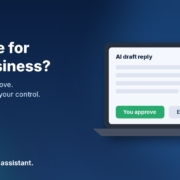
When I talk to small business owners about AI, the first question usually isn’t “what can it do?” It’s “can I actually trust it?” Fair enough. You’ve spent years building your reputation, your customer list and your way of doing things. The idea of a tool making decisions on your behalf, or your customers’ details ending up somewhere they shouldn’t, is a good reason to hold back.
You’re not alone in feeling that way. The National AI Centre’s AI adoption insights for December 2025 to February 2026 found that around 65% of businesses not adopting AI pointed to trust, either distrust of AI making decisions or wanting to keep human control of their processes.
So is AI safe for small business in Australia? It can be, if you set a few simple rules before you start. In this post I’ll walk you through the five I use: AI drafts and you approve, know what never goes in, pick the right account and settings, write a one-page staff policy, and understand the privacy basics. None of this needs a tech team. It works the same whether you use ChatGPT, Claude, Grokbot or any AI assistant.
A quick note: this is practical guidance from someone who sets up AI for small businesses, not legal advice. If you’re unsure about your obligations, talk to your lawyer or industry association.
Rule 1: AI drafts, you approve
This is the most important rule, and it answers most of the “losing control” worry on its own. In the setups I build, AI doesn’t make the final call. It does the first draft and a human signs it off.
That means:
- AI writes the reply to an enquiry, and you read it before it’s sent
- AI drafts the quote from your notes, and you check every price
- AI sorts your inbox and flags what’s urgent, and you decide what to do about it
- AI summarises your week’s numbers, and you choose the actions
Start with “draft only” and earn trust
When you first set up an AI agent, keep it in draft-only mode. Read everything it produces for a couple of weeks. You’ll quickly see where it’s reliable and where it needs better instructions. Only once you’re genuinely comfortable should you consider letting low-risk, repeatable messages go out with lighter checking, and even then, keep a human on anything involving money, complaints or promises.
Decide what always needs a human
Write down the short list of things AI should never decide on its own. For most businesses it looks something like this:
- Prices, discounts and refunds
- Anything about bank details or payments
- Complaints, disputes and anything legal
- Hiring, firing or staff matters
- Promises about timeframes or results
Put that list into your AI instructions too, so the assistant knows to flag these for you instead of answering them.
Rule 2: Know what not to paste into AI
Most data worries come down to one habit: people paste in more than the job needs. The fix is simple. Give the AI only what it needs to do the task, and leave out the rest.
Never paste these
- Passwords, logins and security codes
- Full bank account or card numbers
- Tax file numbers and identity documents
- Health information about customers or staff
- Anything you’ve promised to keep confidential, such as a client’s commercial details under an agreement
Strip out personal details when you can
A lot of the time, AI doesn’t need to know who the customer is. If you want help writing a reply to a tricky email, you can replace names, phone numbers and addresses with placeholders like [customer] or [suburb]. The draft will be just as good, and you add the real details back in before you send it.
A good test before you paste anything: would I be comfortable if this customer saw exactly what I put in? If the answer is no, take it out.
Rule 3: Pick the right account and check your data settings
Not all AI accounts handle your data the same way. Free personal accounts, paid personal accounts and business or team accounts often come with different terms about how your conversations are stored and whether they can be used to improve the provider’s models.
What to check in your AI assistant
- Training settings: many assistants have a setting to stop your chats being used for model training. Find it and decide on purpose, rather than leaving the default.
- History and retention: check how long chats are kept and how to delete them.
- Business plans: if your team uses AI for work, a business or team plan usually gives you more control over data and who has access. Read the provider’s current terms rather than relying on what someone said online, because these change.
- Connected apps: if you connect AI to your email, calendar or files, only connect what the job needs, and review those connections every few months.
One account for work, one for personal
Keep work use on a work account. It’s far easier to manage access, settings and handover when staff aren’t mixing business data into their personal accounts.
Rule 4: Write a one-page staff AI policy
If anyone besides you uses AI in the business, you need a short policy. Not a 30-page document nobody reads. One page, plain English, that people can actually follow.
What to put on the page
- Approved tools: which AI assistants staff can use for work, and on which accounts
- What’s OK: drafting emails, summarising notes, writing first drafts of documents, brainstorming
- What’s not OK: the “never paste” list from Rule 2
- The approval rule: AI drafts, a person checks before anything goes to a customer
- Who to ask: one named person for questions or if something goes wrong
Let AI write the first draft of the policy
Here’s an example prompt you can adapt:
“I run a [type of business] in [city] with [number] staff. Write a one-page AI use policy in plain Australian English. Include approved tools ([list your tools]), what staff can use AI for, what they must never paste in (passwords, bank details, tax file numbers, health information, confidential client details), a rule that a person checks everything before it goes to a customer, and who to contact with questions ([name]). Keep it under 400 words.”
Then read it, change anything that doesn’t fit how you work, and go through it with the team. Five minutes at a team meeting is enough.
Rule 5: Understand the Australian privacy basics
The Office of the Australian Information Commissioner (OAIC) is the place to go for the official word on privacy. Two pages are worth bookmarking.
Does the Privacy Act apply to you?
The OAIC’s small business page explains that most small businesses with an annual turnover of $3 million or less aren’t covered by the Privacy Act, but some are regardless of turnover, including health service providers and businesses that trade in personal information. It has a checklist to help you work out where you stand. Even if you’re not covered, the OAIC recommends protecting the personal information you hold as best practice, and your customers will expect it anyway.
The OAIC’s guidance on AI products
The OAIC has published guidance on privacy and the use of commercially available AI products. It’s written for organisations using tools like the AI assistants above, and it’s worth a read before you put customer information into any of them. The Australian Privacy Principles quick reference is also handy, especially the principles on using and disclosing personal information and keeping it secure.
If you’re covered by the Act and plan to use AI with customer data, it’s worth getting proper advice. That’s a small cost compared with getting it wrong.
What to do this week
- Pick one task where AI drafts and you approve. Enquiry replies or meeting notes are good places to start. If you’re not sure which, my post on where to start with AI in a small business walks you through choosing one.
- Check your settings in the AI assistant you use: training, history and connected apps.
- Write your “never paste” list and your “always needs a human” list.
- Draft your one-page policy with the prompt above, then share it with the team.
- Do the OAIC checklist to see whether the Privacy Act applies to you.
That’s an hour or two of work, and it puts you in a much stronger position than most businesses that are already using AI without any rules at all.
Frequently asked questions
Is AI safe for small business in Australia?
It can be, if you keep a human in charge of decisions, keep sensitive information out, use the right account settings and know your privacy obligations. The risk usually comes from how AI is used, not from using it at all.
Will AI send messages to my customers without me knowing?
Only if you set it up that way. You can run AI in draft-only mode, where it writes and you send. That’s how I recommend everyone starts, and for anything involving money or complaints, it’s how I recommend it stays.
Do I need a business account, or is a free one fine?
For quick personal tasks with no customer information, a free account with sensible settings may be enough. If your team uses AI for work or you handle customer details, a business or team plan usually gives you more control. Check the provider’s current terms before you decide.
What if a staff member pastes something they shouldn’t?
Don’t panic. Delete the chat, check the provider’s options for removing data, and tell the person responsible in your policy. If personal information was involved and you’re covered by the Privacy Act, check the OAIC’s guidance on what to do next. Then use it as a reminder for the whole team about the “never paste” list.
Does AI make mistakes?
Yes. It can get facts wrong or sound confident when it shouldn’t. That’s exactly why the “AI drafts, you approve” rule matters. Treat everything it writes as a first draft from a keen new staff member: useful, quick, and always worth checking.
Want help setting AI up safely?
If you’d like a second set of eyes on where AI fits in your business and the guardrails you need, book an AI audit and we’ll go through it together. Or start with the free AI agents pack. Every agent in it is built on the “AI drafts, you approve” rule, and it works with ChatGPT, Claude, Grokbot or any AI assistant. You might also like my guide to sorting your inbox with AI without missing a lead.