
“We’ve been using AI for a few months now. I think it’s helping?” I hear some version of that from small business owners all the time. They’re paying for a ChatGPT or Claude subscription, the team is drafting emails with it, someone’s using it for quotes, and the general feeling is positive. But when I ask how much time it’s actually saving, nobody knows.
That matters more than it sounds. If you can’t see what AI is saving you, you can’t tell which workflows to keep, which to fix and where to put your next hour of effort. In this post I’ll show you a simple way to measure the time AI saves your business: time one task before you change anything, keep a basic before-and-after log, count quality as well as speed, and then use the numbers to decide what’s next. No spreadsheets full of formulas, and no consultants’ dashboards.
Why “it feels faster” isn’t good enough
AI feels fast because the first draft appears in seconds. What you don’t notice is the time spent writing the prompt, reading the output, fixing the bits it got wrong and checking the facts. Sometimes that adds up to more than doing the job yourself.
There’s good research showing how unreliable our gut feel can be here. In an early-2025 randomised trial by METR, experienced software developers expected AI tools to speed them up by 24%. They actually took 19% longer on tasks where AI was allowed, and afterwards they still believed AI had sped them up by 20%. METR has since said those results are out of date for current tools, and that study was about developers, not small businesses. But the lesson about perception holds: how fast something feels and how fast it is can be two different things.
On the other side, the Australian Government’s whole-of-government trial of Microsoft 365 Copilot found real gains in specific tasks. According to Nous Group’s write-up of its evaluation for the Digital Transformation Agency, participants estimated savings of around an hour on summarising content, creating first drafts and searching for information, and 40 per cent of post-use survey respondents said they were able to shift time to higher-value work. Those are estimates from participants, and the DTA’s trial reports describe them as perceived time savings. That’s useful as a guide to where to look, but your business needs its own numbers.
Step 1: Pick one task and time it before you change anything
Don’t try to measure “AI” across the whole business. Pick one task that happens often, follows roughly the same steps each time and takes a noticeable chunk of someone’s week. Good candidates:
- Replying to new enquiries
- Writing quotes or proposals
- Turning meeting notes into actions
- Following up quotes that have gone quiet
- Writing the weekly summary of how the business is going
If you’re not sure where to start, my 30-minute AI audit for small businesses walks you through finding the jobs worth handing to AI first.
How to time it without making it a project
For one or two weeks, every time someone does the task the usual way, they jot down three things: the date, how long it took (start to genuinely finished, including checking) and anything that went wrong. A note on their phone or a shared doc is plenty. Five to ten examples is enough to give you a fair baseline.
The key is to do this before you bring AI into the task. Once the new way is in place, nobody remembers how long the old way really took, and everyone’s guess gets rosier with time.
Step 2: Keep a simple before-and-after log
Once you have your baseline, switch the task over to the AI-assisted version and keep logging the same way for another week or two. Count the whole job: writing or picking the prompt, reviewing the output, editing and sending.
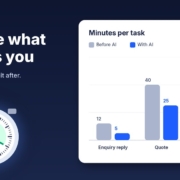
Here’s what a log might look like. These numbers are an example only, not results from a real business:
| Task (example) | Before AI: average time | With AI: average time | Notes |
|---|---|---|---|
| Reply to a new enquiry | 12 min | 5 min | Uses a tested prompt and service sheet |
| Write a standard quote | 40 min | 25 min | Pricing still checked by hand |
| Weekly business summary | 60 min | 20 min | AI drafts, owner adds the decisions |
Then multiply by how often the task happens. If a 7-minute saving happens 30 times a month, that’s three and a half hours. Small savings on frequent jobs often beat big savings on rare ones.
Put a dollar figure on it (roughly)
If you want to compare the saving with what you’re paying for tools, multiply the hours saved by the cost of the person’s time. Keep it rough. The point isn’t accounting precision; it’s seeing whether a workflow is clearly worth it, borderline or not worth it.
Step 3: Count quality too, not just speed
A faster job that creates more rework isn’t a saving. Alongside time, track two or three simple quality markers for the task you’re measuring:
- Errors caught before sending: wrong prices, wrong names, made-up details.
- Rework after sending: customers asking for clarification, corrected quotes, follow-up emails to fix something.
- On-time rate: how many enquiries got a reply the same day, or how many quotes went out when promised.
Why quality is often the bigger win
Sometimes AI doesn’t save much time at all, but the job gets done more consistently. Follow-ups actually go out on day three. Every quote includes the same clear inclusions and exclusions. That consistency is worth measuring, because it’s often where the money is. A follow-up that goes out reliably is worth more than one that’s quicker to write but forgotten half the time. (If follow-up is your weak spot, I’ve written about how to follow up leads with AI without being pushy.)
Step 4: Decide whether to keep, tweak or drop each AI workflow
After two to four weeks of logging, look at each workflow and make a call. I use three simple buckets:
Keep
Time is clearly down, quality is the same or better, and the team is actually using it. Write the process down so it doesn’t depend on one person, and move on.
Tweak
There’s some saving, but the review and editing time is eating most of it. This usually means the AI doesn’t have enough context. Give it a better prompt, a service sheet, examples of good past work or a checklist to follow, then measure again for a week.
Drop
No real time saving, more errors, or the team keeps going back to the old way. That’s not failure, it’s useful information. Not every job suits AI, and stopping a workflow that doesn’t work frees up attention for one that will.
Whatever you decide, keep a person responsible for checking the output on anything that goes to a customer. Measuring isn’t just about speed. It’s how you find out whether the AI is getting things wrong before your customers do.
Step 5: Turn the numbers into your next priority
Once you’ve got one or two workflows measured, the numbers start telling you where to go next. Look for the pattern: which kind of task gave you the best saving? If drafting from a good template worked well for quotes, the same approach will probably work for proposals, onboarding emails or job ads.
I’d also suggest adding your AI numbers to a regular check-in. If you’re already doing a weekly business review with AI, add one line: hours saved this week, and anything that needed fixing. Over a few months that gives you a clear picture of what AI is actually doing for the business, and a much better basis for deciding where to spend next.
If you’d like a second pair of eyes on which tasks to measure first, that’s exactly what the free AI audit is for.
What to do this week
- Choose one task that happens at least a few times a week and follows similar steps each time.
- Set up a simple log: date, time taken, anything that went wrong. A shared note is fine.
- Time it the old way five to ten times before changing anything.
- Write down your quality markers: errors, rework and on-time rate.
- Book a 15-minute check-in in two weeks’ time to switch the task to AI and start the “after” log.
FAQ
How do I measure the time AI saves my business?
Pick one repeated task, time it the usual way five to ten times, then switch to the AI-assisted version and time it again the same way. Count the whole job, including writing the prompt, checking the output and fixing mistakes, then multiply the difference by how often the task happens.
How long should I measure before deciding?
Two to four weeks is usually enough for a task that happens several times a week: one to two weeks for the baseline and one to two weeks with AI. For tasks that only happen monthly, you’ll need a longer window or a different task to start with.
What if AI isn’t saving any time?
Check whether review and editing are eating the saving. Often the AI needs more context, such as a better prompt, a service sheet or examples of good past work. If it still isn’t helping after a tweak, drop that workflow and try a different task.
Should I measure quality as well as time?
Yes. Track errors caught before sending, rework after sending and whether jobs go out on time. A workflow that saves a little time but makes follow-ups far more consistent can be worth more than a faster one that creates rework.
Do I need special software to track AI time savings?
No. A shared note or a simple table with the date, time taken and any problems is enough for a small business. The habit of measuring matters far more than the tool you use.
Find out where AI will save you the most time
Book a free AI audit and we’ll work out which jobs in your business are worth measuring and handing to AI first. Want to start straight away? Grab the free Steal My AI Agents pack: ready-to-use agents for lead replies, follow-ups, reviews, onboarding, inbox triage and a weekly business review. Works with ChatGPT, Claude, Grokbot or any AI assistant.